


You can grab the extension from [here] and a double click should install it , after the install is completed you should see the image above if you navigate to chrome://extensions :
Options :

Once you have installed the plugin, there are 2 required configuration options:
1) Directory with gpg binary
2) Temp folder path (writable by the browser)
(cr-gpg simply calls out to the gpg installation on your machine. Option [1] therefore is asking where it can find the gpg executable, and Option [2] is looking for a scratch directory to do its work). (We make some effort to ensure that the temp directory is well maintained). You should be able to click “Use Default” on most installations.
The “Encrypt to self” option is fairly self explanatory. If i encrypt (and send) an email to you, the encrypted email will be in my sent-items. I would be unable to read this mail though (since it has been encrypted with your public key, not mines). If you would like to be able to read the mails as well, then simply select this option (and enter your email address in the next field: “Encrypt to self Email Address”)
Now click “Save” to save these options. (cr-gpg will do some basic sanity checking on your options). You can return to these options through the extensions window or by clicking the lock icon added to your browser chrome
Convenience Functions :
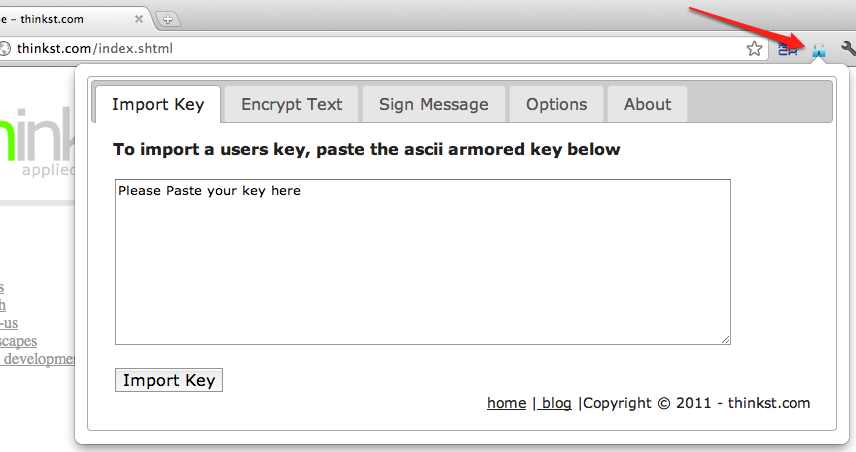
The other convenience functions enabled through the lock icon allow you to do simple gpg key management, encrypt and sign blocks of text.
Embedded Functions :

When typing an email in GMail, we should now see an additional link: “Encrypt Message”
(If we have the recipients public key,) simply clicking this should encrypt the mail to the recipient as seen below.

When you receive an encrypted email, simply click on “Decrypt Message”.

Decrypting an email requires access to your private key (which is usually password protected.) Enter the password, Click “OK” and you should be good to go..

Give it a try [here], and let us know if you have bugs [here], comments, complaints or suggestions..
65 comments On Chrome Extension for gpg in Gmail
Is this completely abandonded by now? I just found this, and I like the approach to use gpg (the program) directly instead trusting private keys into some javascript! But this doesn't even install anymore as it's NPAPI
HI the auto save thing mentioned by JohnBrown above seems to kill the use of this plugin? Is there any way to disable that feature?
Hi it looks like the new compose window breaks the plugin again. Its possible to bring the buttons back by -> choosing the small down arrow icon in the bottom right -> then selecting 'temporarily switch back to old compose'. Dont know how long gmail will keep that function though.
Too bad General Petraeus and Broadwell didn't know about this.;-P
Jameel,Thank you for the explanation regarding manifest.json. The msg “All data on your computer and the websites that you visit” is unfortunate.I have another question. When I am composing a gmail using the web interface, I strongly suspect that the web form is auto-saving at frequent intervals. If this is so, then my partially composed message is being transmitted to google's servers multiple times “in the clear” until the cr-gpg “Encrypt message” is clicked. Does cr-gpg disable such auto-saving? What am I missing? thanks…
@ Anonymous (August 1, 2012)The language specific changes have been made to the repo (http://github.com/rc1140/cr-gpg) and will be rolledinto the next version. I am not 100% sure what you are referring to with the attachments , if you could dropme and email with a bit more details.@John BrownThis requirement you are referring to is because we use npapi which google does not have control over as suchthey mark the plugin as having full access. If you have a look at the manifest.json (https://github.com/RC1140/cr-gpg/blob/master/chromeExtension/manifest.json) which describes the plugin you will see that we currently only require access to gmail.com and the ability to pop open the options tab when you have not updated your settings.@Nom De GuerreThe first iteration of your options should work but your temp settings may be a little to long and be causing somethingto go wrong internally. Try creating a temp directory like c:\temp and making sure your user has access to the folder.As mentioned to other users , drop me a mail directly and I can help to see what you are doing differently from the otherusers.@ Anonymous (August 28, 2012)You can use the command
which gpgfrom the console to get the full path to the application.Alternatively its general location should be @ '/opt/local/bin/gpg' which is the default location cr-gpg uses.As mentioned to the previous users , drop me a mail so that I can get more details to figure out what might bedifferent.This post has gotten quite long , but if you require support drop me a mail @ jameel at thinkst.comand I will try my best to help you outHello… I also cannot configure Directory with gpg binaryTemp folder path (writable by the browser)I am using chrome on a MAC with gpgtools
Hi! I'm trying cr-gpg (0.7.8) on Windows XP (SP3) 32-bit, Google Chrome 21.0.1180.79, Gpg4win 2.1.0.cr-gpg installs, but if I try setting the “Directory with gpg binary” and “Temp folder path” options by clicking “Use Default”, the paths entered are:/opt/local/bin/and/tmp/which are obviously incorrect (on a win32 system). If I click Save, I get an error message (as expected): “options saved but parameters provided are invalid.”No matter the incantation used in the path fields, I always see this error message when clicking Save. Here are the paths I've tried:C:\Program Files\GNU\GnuPGandC:\Documents and Settings\username\Local Settings\Application Data\Google\Chrome\User Data\TempC:\Program Files\GNU\GnuPG\pubandC:\Documents and Settings\username\Local Settings\Application Data\Google\Chrome\User Data\TempC/Program Files/GNU/GnuPGandC/Documents and Settings/username/Local Settings/Application Data/Google/Chrome/User Data/TempC/Program Files/GNU/GnuPG/pubandC/Documents and Settings/username/Local Settings/Application Data/Google/Chrome/User Data/Temp/Program Files/GNU/GnuPGand/Documents and Settings/username/Local Settings/Application Data/Google/Chrome/User Data/Temp/Program Files/GNU/GnuPG/puband/Documents and Settings/username/Local Settings/Application Data/Google/Chrome/User Data/TempWhat am I missing?
Thank you for developing such an important extension. However, during installation I am asked to grant access to “All data on your computer and the websites that you visit”. This does not sound like the kind of thing that I want to do when I am aiming to increase my security situation thru the use of GNU Privacy Guard. I wonder if you might consider completely removing this requirement from the installation. I am unable to use the extension in its current form.
This is really great. I have two questions though:1.) Being a Google Apps user, I'd like to switch to German language with the general user interface. If I do so, the buttons for Decrypt message and Encrypt message do not show up. When I switch to “English (US)” everything is fine. Any chance to show the buttons also in different languages? 😉 If this is just the German translation missing, I'm happy to help with that.2.) When decrypting a message, inbound base64 attachments (from multipart messages) are not shown as attachments any more, but just with pure base64 code. Do you see a chance that this can be shown as a regular attachment in the future?
Awesome extension, big up the thinst.com crew!
Hi, thanks so much for your work on this much needed package. 🙂 I installed it yesterday and had it working fine, but today I can no longer see the decrypt button (I can still see the encrypt one, and I can still decrypt manually by cutting and pasting into the tool box). Any suggestions?I'm using Windows XP, Chrome 19.0.1084.52 and Cr-gpg (Version : 0.7.8) Thanks, Holly
so….this is what i diddownloaded http://www.gpg4win.org/ as well as the plugin set it the plugin to my install dir,and no go? what am i missing?
hello first off great extension nice to see more ways to encrypt emailmy question is is there any chance that this can be made portable ie to run off a USB stickthanks in advance Glen
Hi AnonThat is expected , we don't make the decrypted text available anywhere except temporarily when you click the decrypt button. Unfortunately the only way I can think of you quoting text in a reply is with a manual copy and paste. If you think this is a feature others will need then please log an issue over at http://github.com/rc1140/cr-gpg/issues .This will allow us to track the progress and let you know when the feature is released.